
Appearance
Managing Affiliates
TL;DR: Register affiliate partners with a name, website, and domain. Link Manager Pro auto-links that domain's URLs in your content and tracks clicks per affiliate. You set default link attributes and view per-partner analytics.
Register affiliate partners, configure auto-linking for affiliate URLs, and track affiliate performance.
Go to Link Manager → Affiliates to open the affiliate list. Use the search bar to find partners by site name, domain, affiliate link, or keywords.
Affiliate Fields
Each affiliate partner supports the following fields:
| Field | Description |
|---|---|
| Site Name | Required. A recognizable label for this partner (e.g., "Amazon", "Bluehost"). Max 100 characters. |
| Affiliate Link | Required. The full affiliate URL pattern (e.g., https://amazon.com/?tag=myid-20). |
| Domain | Auto-extracted from the affiliate link. Strips www. prefix. Must be unique across all affiliates. |
| Redirect Type | The HTTP redirect code for this affiliate's masked links. Options: 301 (default), 302, 307. |
| Keywords | Comma-separated keywords for auto-linking in post content. |
| Enable Auto-Linking | Toggle to activate keyword auto-linking for this affiliate. |
| Auto-Link Priority | Controls which entry wins when keywords overlap. Range: 0–100. Default: 10. Lower number = higher priority. |
| Attributes | Toggles for nofollow, noopener, noreferrer, and sponsored rel attributes. Default: nofollow and noopener are on. |
| UTM Parameters | Optional tracking values appended during redirect: utm_source, utm_medium, utm_campaign, utm_term, utm_content. Max 200 characters each. |
Creating an Affiliate Partner
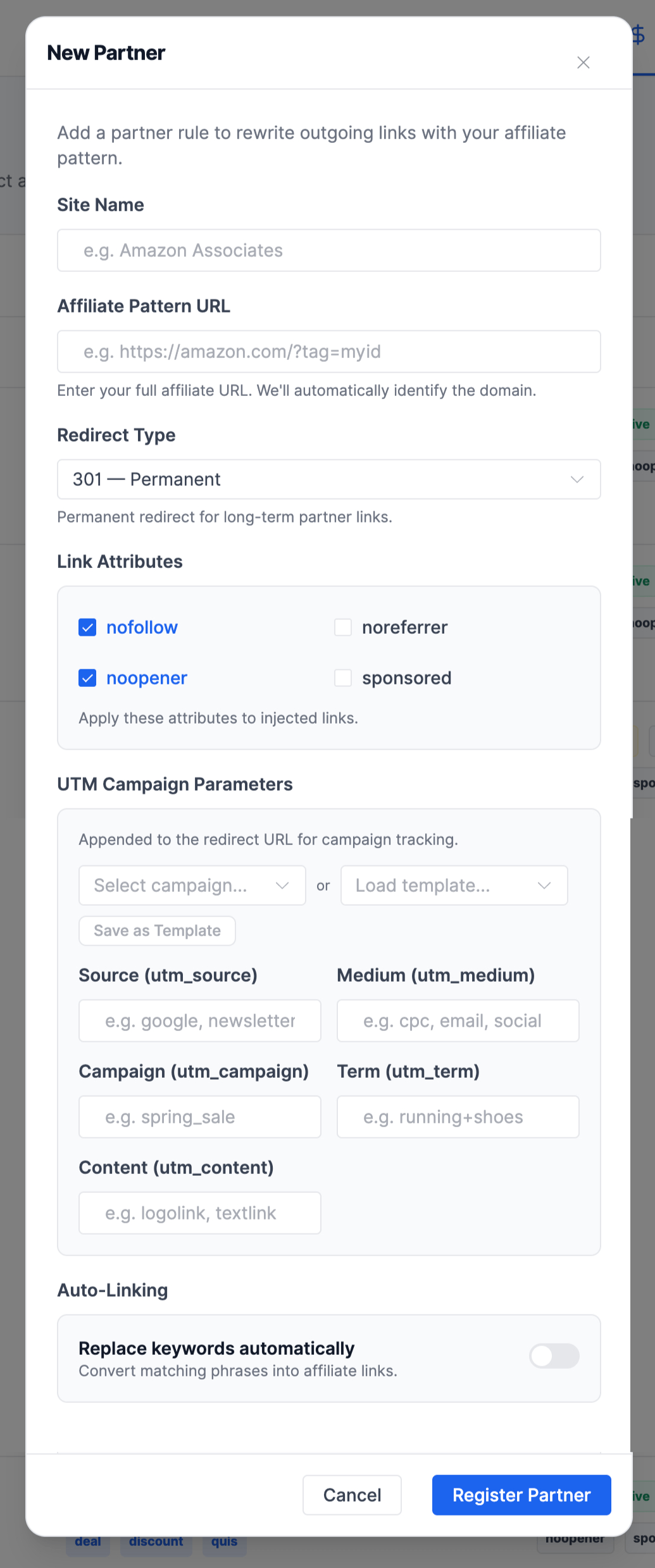
- Go to Link Manager → Affiliates.
- Click New Partner.
- Enter the Site Name — a recognizable label for this partner.
- Enter the Affiliate Link — the full affiliate URL. The plugin automatically extracts the domain from this URL.
- Select a Redirect Type (default: 301).
- Configure Link Attributes — toggle nofollow, noopener, noreferrer, or sponsored as needed.
- Add Keywords for auto-linking. Separate multiple keywords with commas.
- Toggle Enable Auto-Linking on if you want keywords in post content to link to this affiliate automatically.
- Set Auto-Link Priority (default: 10) if multiple affiliates share overlapping keywords.
- Add UTM Parameters to append campaign tracking values to the affiliate URL.
- Click Register Partner.
Key Behaviors
Domain Uniqueness
Two affiliates cannot share the same domain. The plugin enforces this by extracting and deduplicating domains from affiliate link URLs. If you try to register a second affiliate with a matching domain, validation fails.
Automatic UTM and Attribute Inheritance
When a visitor clicks any masked link whose destination matches an affiliate's domain, the plugin appends that affiliate's UTM parameters to the redirect URL. When auto-linking inserts an affiliate's keywords into post content, the plugin applies the affiliate's rel attributes (nofollow, noopener, etc.) to the generated link. You do not need to set these values manually on each link.
Automatic Pretty Link Creation
When you save an affiliate, the plugin automatically creates a pretty link (masked redirect) for the affiliate URL. This ensures auto-linked keywords point to a masked URL rather than the raw affiliate URL.
Click Tracking
Each affiliate tracks its own click count. When a visitor clicks any masked link whose destination matches the affiliate's domain, the affiliate's click count increments.
Editing an Affiliate
- Go to Link Manager → Affiliates.
- Click the edit icon on the affiliate you want to modify.
- Update any fields.
- Click Update Partner.
Deleting an Affiliate
- Go to Link Manager → Affiliates.
- Click the trash icon on the affiliate you want to remove.
- Confirm the deletion in the popup.
Warning: Deleting an affiliate removes the partner record. Review any auto-linked content that references this affiliate.
Affiliate Auto-Linking
Affiliate auto-linking works the same way as link auto-linking, but uses the affiliate's pretty link as the destination.
How It Works
- You add keywords to an affiliate and enable auto-linking.
- The plugin creates a pretty link for the affiliate URL.
- When WordPress renders a post, the plugin scans the content for keyword matches.
- Matched keywords are replaced with links pointing to the affiliate's pretty link.
- The plugin respects all global auto-linking settings: case sensitivity, max replacements per keyword, max links per page, excluded headings, and applicable post types.
Priority Resolution
When a keyword matches both a link and an affiliate, the affiliate always wins regardless of priority values. The Auto-Link Priority value resolves conflicts within the same type — affiliate vs. affiliate or link vs. link. Lower numbers take priority.
Best Practices
- Use specific, multi-word keywords: "WordPress managed hosting" instead of "hosting".
- Check a few posts after setup to verify keywords link correctly.
- Monitor affiliate reports to measure click-through performance.
- Avoid single-word keywords that appear frequently — this leads to excessive link insertion.
Affiliate Report
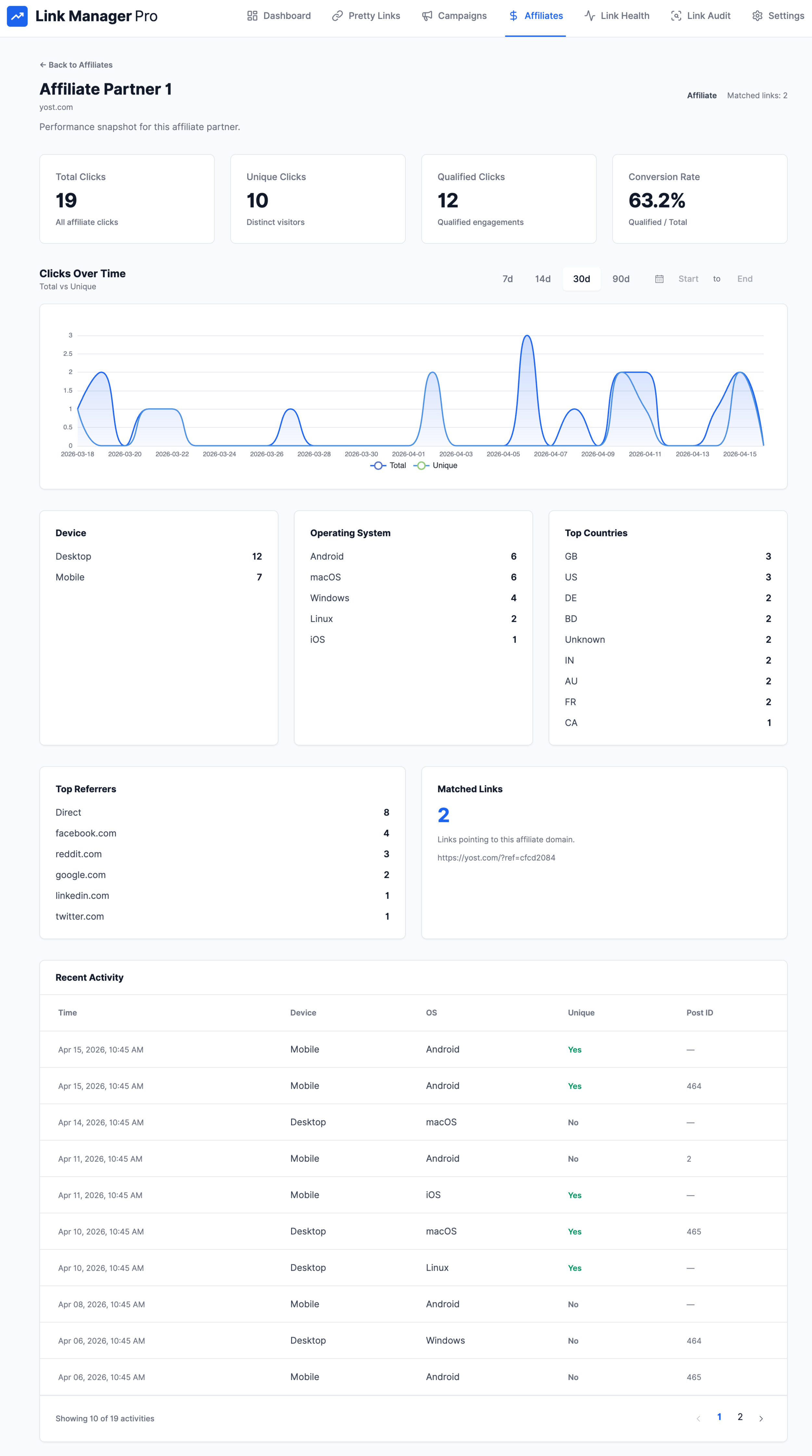
Click an affiliate row to open the affiliate report. The report provides the same structure as the per-link report, aggregated across all links matching the affiliate's domain:
- Summary: total clicks, unique clicks, qualified clicks
- Device distribution: Desktop, Mobile, Tablet, Other
- Operating system: Windows, macOS, iOS, Android, Linux, Other
- Country breakdown: visitor countries
- Referrer domains: traffic sources
- Clicks over time: time-series chart with date range selection
- Recent activity: paginated list of recent click events
Step-by-step guides: