
Appearance
Dashboard & Reports
TL;DR: The Dashboard shows aggregate click data, top-performing links, top affiliates, and link health status. Click any link or affiliate row to open a detailed report with device, country, OS, and referrer breakdowns. View campaign reports with UTM variant performance.
Track link performance, measure audience engagement, and review traffic patterns across your links, affiliates, and campaigns.
Dashboard Overview
Go to Link Manager → Dashboard to view the dashboard.
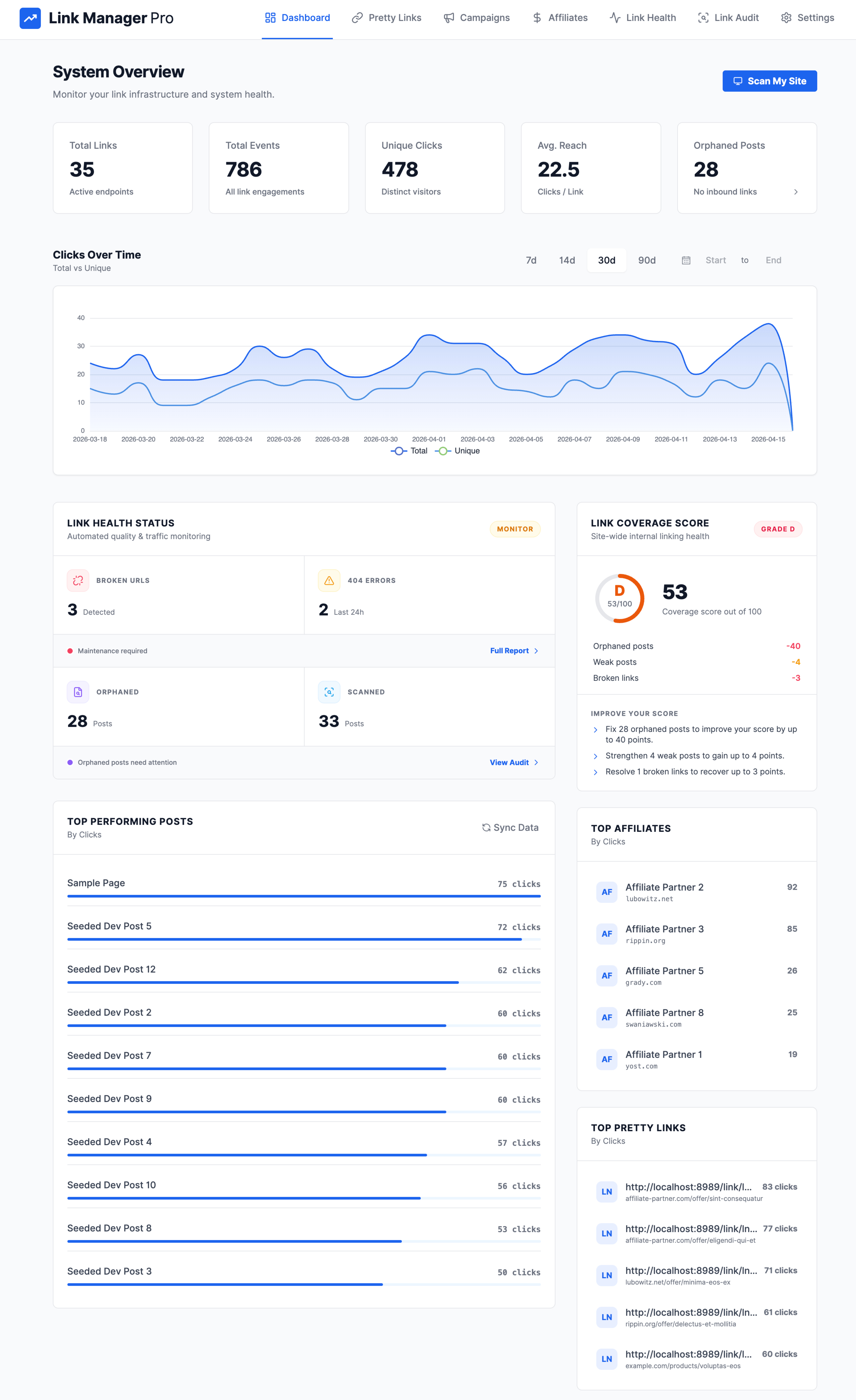
Top-Level Metrics
| Metric | Description |
|---|---|
| Total Links | Count of all active link endpoints |
| Total Events | Sum of all click engagements across all links |
| Unique Clicks | Distinct visitor clicks (deduplicated) |
| Avg. Reach | Average clicks per link |
| Broken Links | Count of broken URLs and 404 errors detected by link health scans |
Dashboard Widgets
| Widget | What It Shows |
|---|---|
| Clicks Over Time | Time-series chart comparing total vs. unique clicks. Defaults to 30 days; filter by custom start and end dates |
| Top Pretty Links | Top links ranked by click count (default: 5, configurable limit) |
| Top Affiliates | Top 10 affiliates ranked by click count |
| Top Performing Posts | Posts with the highest link click engagement |
| Link Health Status | Summary of broken URLs and 404 errors with overall health status |
Per-Link Report
Click any link row in Link Manager → Pretty Links to open a detailed report with click metrics, device/OS/country/referrer breakdowns, a clicks-over-time chart, QR code, and recent activity. For full details, see Managing Links — Per-Link Report.
Affiliate Report
Click any affiliate row in Link Manager → Affiliates to open an aggregate report across all links matching the affiliate's domain. The report follows the same structure as the per-link report. For full details, see Managing Affiliates — Affiliate Report.
Campaign Report
Open a campaign report by clicking a campaign in the campaigns view.
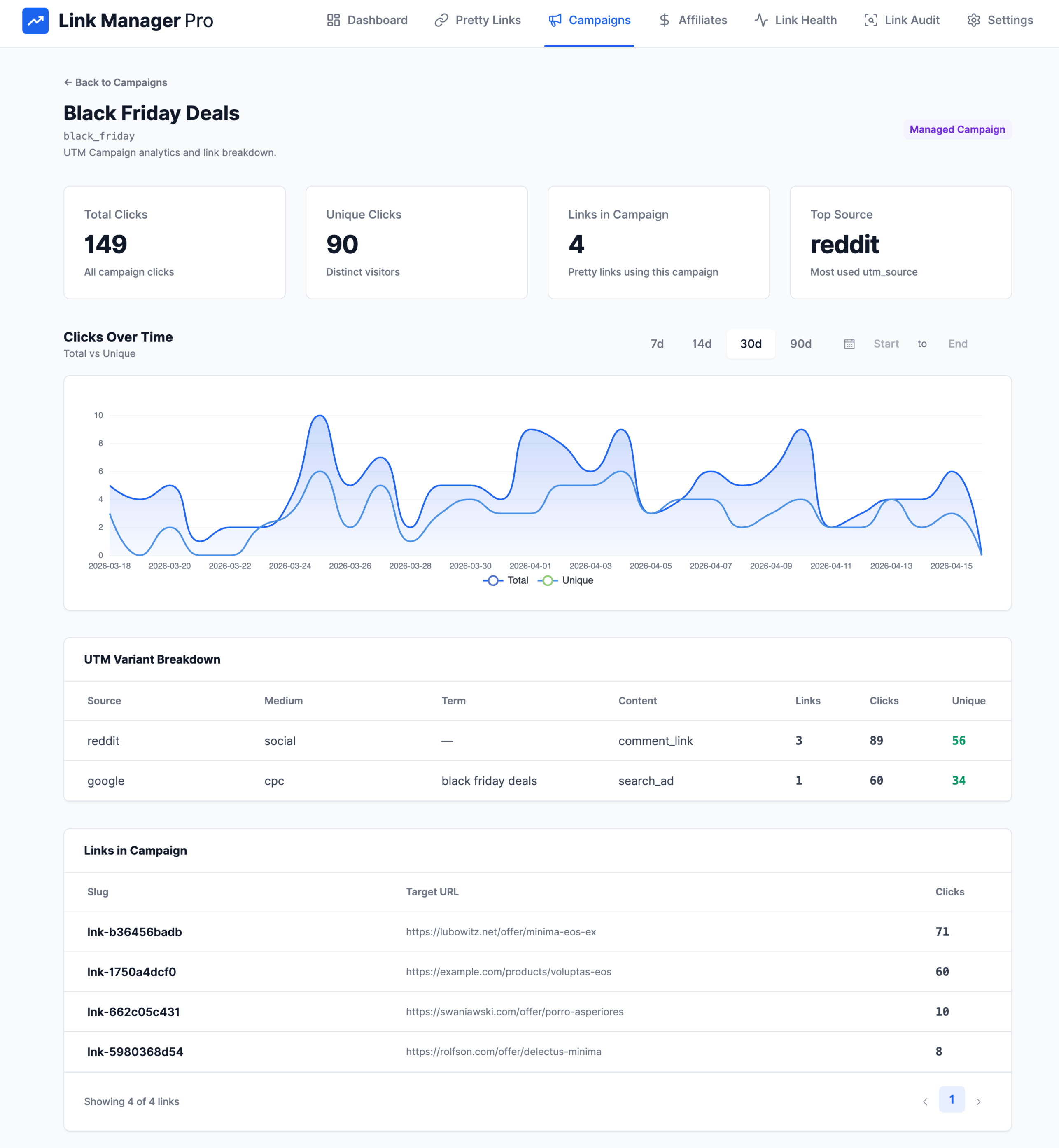
Campaign Metrics
| Metric | Description |
|---|---|
| Total Clicks | Total click events for the campaign |
| Unique Clicks | Distinct visitor clicks |
| Links in Campaign | Number of pretty links using this campaign |
| Top Source | The most used utm_source value across campaign links |
UTM Variant Breakdown
Each row shows a unique combination of UTM parameters used across the campaign's links, with performance metrics for that variant:
| Column | Description |
|---|---|
| Source | Traffic source (e.g., newsletter, twitter, google) |
| Medium | Marketing medium (e.g., email, social, cpc) |
| Term | Paid search keyword |
| Content | Content or creative variant (e.g., header-cta, sidebar-banner) |
| Links | Number of links using this combination |
| Clicks | Total click events for this variant |
| Unique Clicks | Distinct visitor clicks for this variant |
Additional Features
- Clicks over time — time-series chart with selectable date range.
- Campaign links — paginated list of all links associated with the campaign.
Understanding Your Data
Click Patterns
- Spikes in clicks — may indicate viral content, a successful campaign, or bot traffic. Cross-check with the qualified clicks metric.
- Consistent clicks — steady engagement from evergreen content.
- Declining clicks — content may be outdated. Consider updating the destination or the content linking to it.
Geographic Data
Country breakdowns help you:
- Identify your primary audience regions.
- Plan localized campaigns for high-traffic countries.
- Set up geo-targeted conditional routing rules to serve regional landing pages.
Device Types
Understand how visitors access your links:
- High mobile traffic — ensure destination pages are mobile-optimized.
- High desktop traffic — traditional web browsing; consider richer landing page layouts.
- Tablet traffic — verify touch-friendly interfaces.
Referring Sources
Top referrers reveal where your traffic originates:
- Direct — visitors typed the URL or used a bookmark.
- Search — traffic from Google, Bing, and other search engines.
- Social — traffic from social media platforms.
- Referral — traffic from other websites linking to your content.
Use referrer data to double down on high-performing channels and investigate unexpected traffic sources.
Step-by-step guide: How to Track Link Clicks in WordPress