
Appearance
Create your first short link
Create a short link, test it in a private window, and find the click your test records.
To create a short link in WordPress with Link Manager Pro, you enter the long address you want to share. Link Manager Pro gives you a short one on your own domain, like yoursite.com/link/spring-sale, that you can test straight away.
Use WordPress as your link shortener
Link Manager Pro is a link shortener inside WordPress. To shorten a link, you enter the long address, and the short link lives on your own domain, like yoursite.com/link/deal. Its clicks are stored on your site.
Before you start
- Link Manager Pro is installed and active (Install and activate). Setup is optional; Quick start: setup explains what it asks.
- You need access to Link Manager Pro. Administrators always have it. Editors have it only when Who can use Link Manager Pro is set to Editors and above (Access for editors).
- Have the destination ready: the full address your visitors should land on, starting with
https://orhttp://.
Create a short link in WordPress
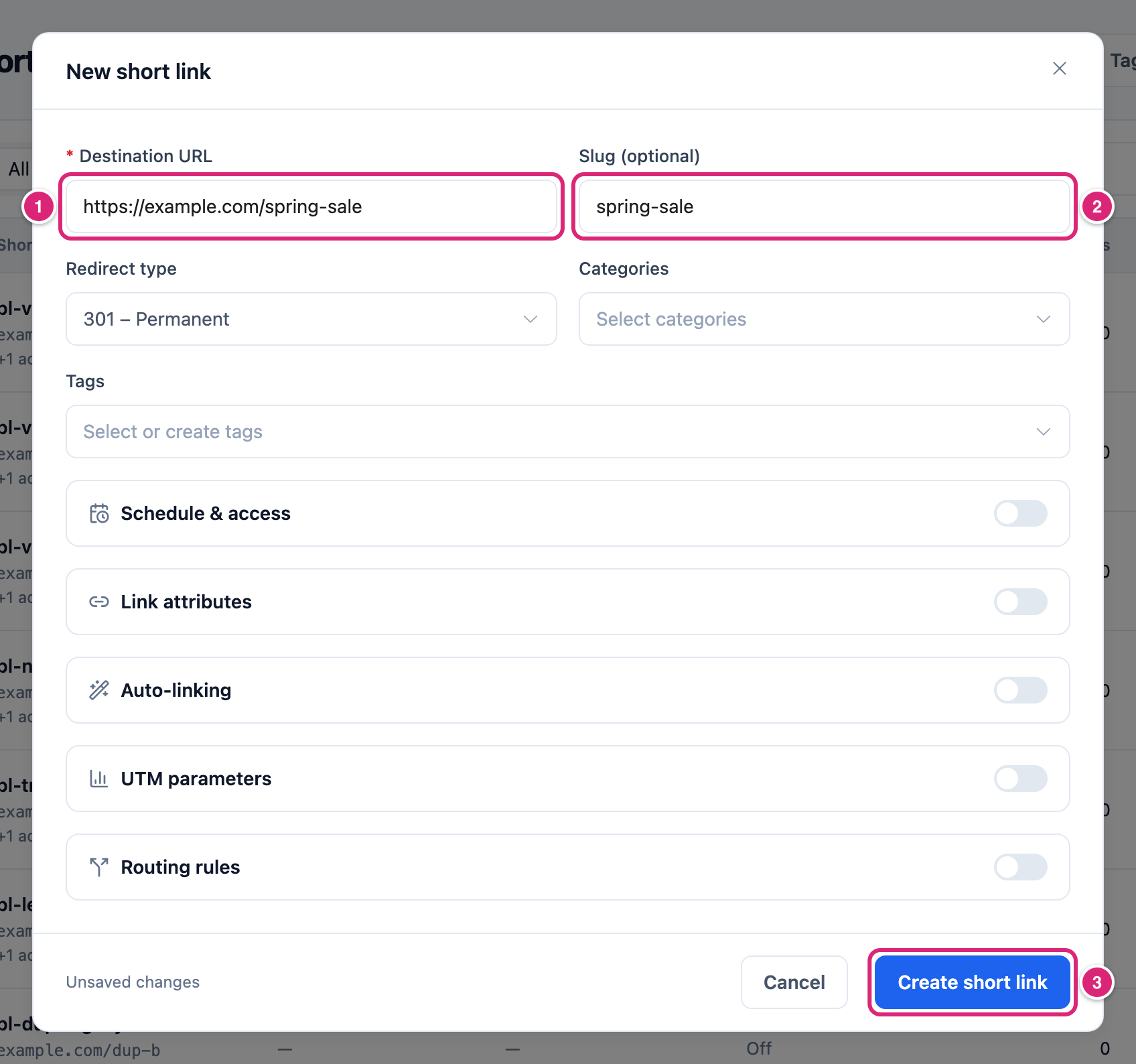
You create a short link in the New short link dialog on the Short Links screen. Only the destination is required; everything else has a starting value.
Link Manager › Short Links- Select New short link at the top right. On a site with no links yet, the New short link button under No short links yet does the same. The New short link dialog opens.
- Enter the Destination URL 1, for example
https://example.com/spring-sale. - Enter a Slug (optional) 2, for example
spring-sale. Leave it empty and Link Manager Pro makes one up for you (slug rules). - Check the Redirect type. It starts with your site's default, which is 301 on a new site (which type to choose).
- Select Create short link 3.
Short link created. appears, and the new link's report opens. Its address is your site, then your Short link prefix (link unless you changed it), then the slug. If you set an Affiliate link prefix and the destination is on one of your affiliates' domains, that prefix comes first instead, like yoursite.com/recommends/amazon-deal (General settings).
You can open the same dialog from Link Manager › Dashboard, too: it's the plus button next to Scan my site, whose tooltip reads New short link. Changed your mind? Select Cancel. If you typed anything, it asks Discard changes? first, and Discard closes the dialog without creating a link.
Choose the slug for a custom short URL
The slug is the part after the prefix: spring-sale in yoursite.com/link/spring-sale. Type your own for a short URL people can read and remember, or leave the field empty for a random one.
Keep it to 64 characters or fewer, with no spaces and no /. Lowercase letters, numbers and hyphens are the safe choice, because they read the same everywhere you paste them. Each slug belongs to one short link only, so a slug that's taken shows This short link slug is already in use.
An empty slug gets a random mix of upper and lower case letters and digits, like eLhQMWKU. It's 8 characters long unless you change Slug length under Link Manager › Settings › General, which takes 6 to 16.
Which redirect type should you choose?
Leave Redirect type on 301 (permanent) for a link that keeps pointing at the same place. Choose 302 (temporary) when the destination is likely to change. 307 is temporary too and keeps the request method. The field starts on your site's default, so most first links need no change here.
That default is Default redirect type under Link Manager › Settings › Redirection, 301 on a new site. Change it there once, and every new short link starts with your choice. You can also change a link's type later: Link Manager Pro tells browsers not to cache its redirects.
Links to a partner work a little differently. New links to one of your affiliates' domains get the affiliate's tag if it's missing, whatever type you pick. If you leave Redirect type as it is, they also get the affiliate's redirect type.
Copy your short link and test it in a private window
Copy the link from its report, then open it in a private window to see what a visitor sees.
- On the link's report, select Copy link at the top right. Link copied. confirms it. In the Short Links list, the Copy link icon in each row does the same.
- Open a private or incognito window in your browser.
- Paste the link into the address bar and press Enter. You land on the destination.
Why private? That window isn't logged in to your site and has none of its cookies, so your admin login doesn't change what the link does. How your click is counted is explained below.
Does your own test count as a click?
Yes. Link Manager Pro doesn't leave out administrators or logged-in users, so your test is recorded like any visitor's click. It counts toward Unique clicks only if it's the first click on that link from this browser. A second test from the same computer, even in a private window, usually isn't a new unique click.
Here's the rule behind that. A click isn't unique when an earlier click on the same link carried the same tracking cookie, or came from the same IP address with the same browser. New sites store IP addresses shortened, so "the same IP address" there means the same network.
Some clicks aren't recorded at all, although the visitor still reaches the destination:
- A bot or crawler, or a browser that sends no name, while Ignore bots is on (the default). Which bots are caught depends on the bot list under Link Manager › Settings › Tracking.
- A click from an address in Blocked IP addresses.
- Clicks past the 30th within 5 minutes from one IP address on the same short link. That's the address your site sees: behind a proxy or CDN without Trust proxy headers, many visitors can share one.
- Every click while Click tracking is off. The All-time clicks number still goes up, but nothing reaches the reports.
How clicks are counted has the whole picture.
See your clicks
Reload the page after your test. The click shows in the All-time clicks column of the Short Links list and under Recent clicks further down the link's report. To get back to the report, select the slug in the list.
The rest of the report takes longer. Clicks under At a glance, the chart and Unique clicks come from a saved copy of the report, which keeps it fast. That copy is kept for the time set in Refresh reports every under Link Manager › Settings › Advanced, then rebuilt: 600 seconds (10 minutes) by default.
Your first test click shows when you reload the report, because a report with no clicks isn't saved. Later clicks can take up to that refresh time. Recent clicks has them sooner. Link report explains every part of the report.
Add a short link from the WordPress dashboard
The Quick Add widget on the WordPress dashboard creates a short link without opening Link Manager Pro. Everyone with access to Link Manager Pro sees it.
- Enter the Destination URL.
- Keep the suggested slug in Custom slug, type your own, or clear it to get a random one.
- Select Create short link. Then select Copy, Manage short links to open the Short Links list, or Add another.
The widget always uses your Default redirect type, even for an affiliate's domain, though it still adds the affiliate's tag. For another type, use the full dialog.
Details
These are the three fields a first link needs. Categories and Tags sit right under them, and everything else is in optional groups: Schedule & access, Link attributes, Auto-linking, UTM parameters and Routing rules. Each stays closed until you turn on the switch on its row. Turning a switch off only hides the group: what you entered there is still saved with the link, so clear a field to remove it. Create and edit a short link covers every field.
| Field | Starts with | What it does |
|---|---|---|
| Destination URL | Empty (required) | Where the short link sends visitors. A full address starting with http:// or https://. |
| Slug (optional) | Empty | The part after the prefix. Up to 64 characters, no spaces or /. Empty means a random slug of Slug length characters (8 by default, 6 to 16; see General settings). |
| Redirect type | Your Default redirect type (301 on a new site) | 301 (permanent), 302 (temporary) or 307 (temporary, keeps the method). |
Create short link stays grayed out until you type something.
Get more out of it
Type a slug for any link you'll say out loud, print or put in an email. yoursite.com/link/spring-sale is far easier to read than a random eLhQMWKU.
Set Default redirect type before you make many links. New short links and new affiliates start with it, but each one keeps its own type after that, so changing the setting later doesn't change links you already made.
Add your partner as an affiliate before you link to its site. New short links to that domain then get its tag, even when you paste a URL without it.
Keep your own clicks out of the numbers once your first test worked. An administrator can add your office's fixed IP address to Blocked IP addresses under Link Manager › Settings › Tracking. Clicks from that address then stop counting, your colleagues' too. It has to be the address your site sees: behind a CDN or proxy, that's the proxy's address unless Trust proxy headers is set up (How clicks are counted).
Share it as a QR code. The link's report has a QR code button and a Share button (Share a link or QR code).
If something goes wrong
- If the dialog says Enter a full URL starting with http:// or https://., then add
https://to the front of the destination. - If it says Spaces are not allowed in a slug. or Use 64 characters or fewer., then use hyphens instead of spaces, or shorten the slug.
- If saving shows This short link slug is already in use., then pick another slug, or leave the field empty for a random one.
- If saving shows This slug can’t be used in a link. Remove "/", line breaks and special control characters., then take the
/out of the slug, for examplespring-saleinstead ofspring/sale. - If the report says No clicks yet after your test, then look under Recent clicks or wait for the report to refresh. If it says Click tracking is off, an administrator can turn Click tracking on under Link Manager › Settings › Tracking; the report offers Turn it on in Settings › Tracking, or Open Tracking settings while it has no clicks yet.
Create short link grayed out? Enter a Destination URL first. More fixes are on Troubleshooting.