
Appearance
Cloak an affiliate link
Turn one long affiliate URL into a short link on your own domain that is tagged, marked sponsored, disclosed and tracked.
To cloak affiliate links in WordPress with Link Manager Pro, make a short link on your own domain, like yoursite.com/link/tent-deal, for your affiliate link. Readers see and click your address. Your site sends them on to the partner's page with your tag, and counts the click.
This tutorial takes one partner from a long affiliate URL to a link that's short, tagged, marked sponsored, disclosed and tracked. Each part links to the page with every detail.
Before you start
- You need access to Link Manager Pro. Administrators always have it, and editors only when an administrator allows it (Access for editors). The disclosure step needs an administrator.
- Have one of your affiliate links from the partner's program at hand, for example
https://outdoor.example.com/?ref=yoursite-21. - Read your affiliate program's terms on redirects and shortened links. Some programs don't allow links that hide their domain. Link Manager Pro doesn't check those terms for you, and these docs give no legal advice.
What does cloaking an affiliate link do?
Affiliate link cloaking means readers see your short link instead of the partner's long address. When someone clicks it, your site answers with a redirect, 301 on a new site. The browser then opens the partner's page, with your tag in the address, so the partner gets the visit and your tag as usual.
- Before the click, readers see only your address, not the partner's domain. Check your program's terms on that.
- Search engines see a link to your own domain, with the
relvalues the link carries, likenofollow sponsored. When they follow it, they get the redirect too. With Ignore bots on (the default), their visits just aren't counted. - After the click, nothing is hidden: the address bar shows the destination's address, and the partner gets the visit with your tag.
nofollow and sponsored are part of the link's HTML on your page, not of the redirect (rel attribute).
Cloak an affiliate link in WordPress
You add the partner once, then make a short link for each page of theirs you link to, and insert it in your post. Add the partner first: only links created after it get your tag.
WARNING
Step 10 updates your post. While Mask links when saving posts is on (the default), updating a published, scheduled or private post also masks it. Its other full links to other sites become short links. To put the original links back, use the WP-CLI command unlink, or restore a backup with Posts and pages ticked (How do I undo link masking?).
- Go to Link Manager › Affiliates and select New affiliate.
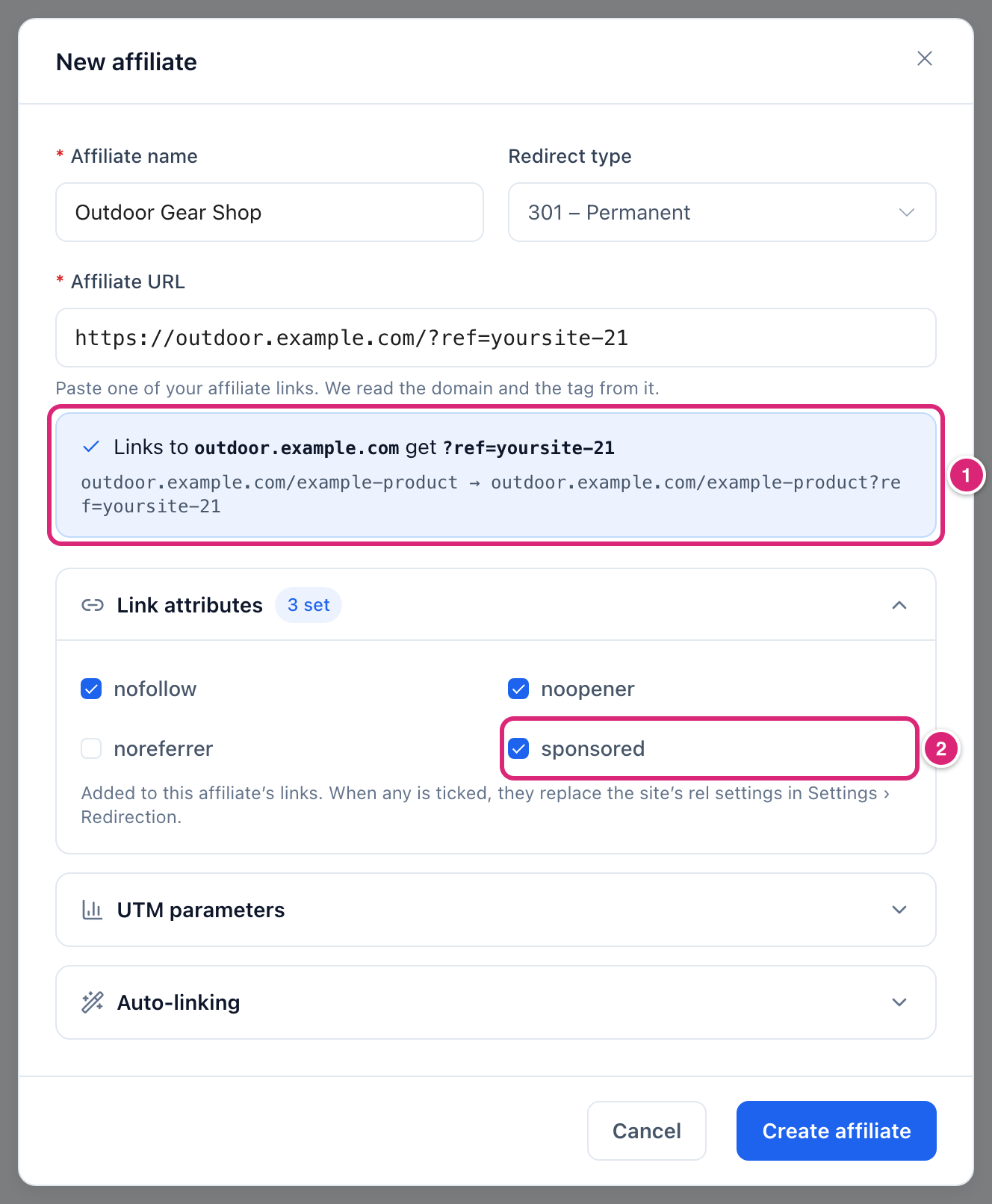
- Enter an Affiliate name, and paste one of your affiliate links into Affiliate URL. Check the box below it 1: it names the partner's domain and your tag (
?ref=yoursite-21here). - Open Link attributes and tick
sponsored2.nofollowandnoopenerare already ticked. Then select Create affiliate. - Go to Link Manager › Short Links and select New short link.
- Enter the partner's product page in Destination URL, like
https://outdoor.example.com/tent. Leave your tag off: Link Manager Pro adds it (?ref=yoursite-21) when it creates the link. - Enter a Slug (optional) your readers can read, like
tent-deal. Leave Redirect type as it is, so the link takes the affiliate's type. - Select Create short link. The link's report opens.
- In your post, select the words to link. Then select Short link (the Link Manager Pro logo) in the block toolbar. In the classic editor, it's Insert short link.
- Type
tent-dealin Search short links… and select the result. - Leave Nofollow on, turn on Sponsored, and select Apply. Then update the post. With Mask links when saving posts on, updating also turns the post's other links to other sites into short links.
Your post now links to yoursite.com/link/tent-deal with rel="nofollow sponsored". A click opens https://outdoor.example.com/tent?ref=yoursite-21. If you set an optional Affiliate link prefix such as recommends, links to your partners use it instead, like yoursite.com/recommends/tent-deal (General settings).
- No affiliate for this partner? Then type the destination with your tag already in it, like
https://outdoor.example.com/tent?ref=yoursite-21. - To skip steps 4 to 7, create the link from the editor box instead: New short link, then Create & insert (Editor tools). Turn on Sponsored before you create it. For anyone with access to Link Manager, the box saves your Default redirect type, not the affiliate's.
Every field of the short link form is on Create and edit a short link. How the tag is added, with examples, is on Affiliates.
How do you check that the cloaked link works?
Open the short link in a private browser window. You should land on the partner's page, with your tag at the end of the address. Then reload the link's report: your test click shows at the top of Recent clicks while Click tracking is on, as it is by default.
- Open a private window and go to your short link, or open the published post there and click the link.
- Check the address bar: the partner's page, with your tag (
?ref=yoursite-21) in the address. - Back on the link's report, reload the page. Your click is at the top of Recent clicks, and All-time clicks in the Short Links list is one higher.
Your own test counts like any visitor's click. Clicks under At a glance show your first click on the next load. Later clicks can take up to 10 minutes to catch up by default (when the numbers update). Some clicks aren't counted, for example from bots or Blocked IP addresses (How clicks are counted).
Add the affiliate disclosure
The affiliate disclosure shows your notice, like "This post contains affiliate links", on single posts and pages of the types you pick. They must link to one of your affiliates, directly or through a short link, or have a sponsored link. It's off until an administrator turns it on.
- Go to Link Manager › Settings › Affiliate disclosure.
- Turn on Affiliate disclosure, read the text and the position below it, and select Save changes.
Your partner counts because you added it under Affiliates in the steps above. A short link to a site that isn't an affiliate doesn't bring the notice. Link Manager Pro doesn't check whether your wording meets the rules that apply to your site. Where the notice sits, how to word it and which posts get it: Affiliate disclosure and Add an affiliate disclosure.
Cloak the affiliate links already in your posts
Affiliate links you pasted straight into posts can become short links without editing each one. Mask links when saving posts is on by default. Then saving a published, scheduled or private post or page turns its full links to other sites into short links. Scan my site on the Dashboard does the same for the published, scheduled and private posts and pages you already have. Drafts, pending posts and links a block keeps in its own settings (like the File block) are left alone.
WARNING
Masking changes your saved posts. Put the original links back with the WP-CLI command unlink, or by restoring a backup with Posts and pages ticked. Back up first, and read Short links in your posts before you run Scan posts.
- Add the affiliate first, with
sponsoredticked. Masked links to its domain then get the affiliate's Link attributes:nofollow,noopenerandsponsored. New short links made by masking get your tag when it's missing. - Masked links keep the
relthey got. Tickingsponsoredon the affiliate later doesn't change links masked before. - Masking covers all those links, including links to partners whose terms don't allow shortened links. There's no setting for a list of domains to skip. To keep such links direct, turn off Mask links when saving posts. A developer can also skip single links with the
link_manager_pro_mask_urlfilter (Link masking).
Do cloaked affiliate links get nofollow and sponsored?
Yes, if you tick sponsored on the affiliate and turn on Sponsored in the editor's Short link box. The link in your post then carries rel="nofollow sponsored". Otherwise its rel depends on how the link got into the post, as this table shows. The redirect is the same either way.
| How the link got into your post | Its rel |
|---|---|
| The editor's Short link or Insert short link button | What you set in the box: Nofollow starts on, Sponsored off. Open in new tab adds noopener. |
| Masked when you saved the post, or by Scan posts | On an affiliate's domain, the affiliate's Link attributes when any is ticked. Otherwise your site's rel settings, nofollow noopener by default. Added to any rel you wrote. |
| Your short link inserted with WordPress's own link tool | Only what you set there. WordPress's box offers nofollow, not sponsored (Editor tools). Masking leaves your own short links as they are. |
| The affiliate's keywords (auto-linking) | The affiliate's Link attributes when any is ticked, otherwise your site's rel settings |
| The short link's own keywords | Your site's rel settings plus the short link's own Link attributes |
| A replaced shortcode from your old plugin | Your site's rel settings, the short link's own Link attributes and the shortcode's own rel (Replace old shortcodes) |
| The AI Link Assistant | AI Link on selected words: what you tick in its box. A suggestion's Insert link (Insert in the classic editor): no rel at all. Create & insert changes only the address and keeps the link's rel (AI Link Assistant) |
More facts:
- A link to your own site never gets
nofolloworsponsoredfrom masking or auto-linking. - The tag is added only when a link is created, and only parameters the address doesn't have yet. Editing a link later adds nothing.
- Left untouched in the form, Redirect type saves the affiliate's type. A new affiliate starts with your Default redirect type: 301 unless you changed it (which type to choose).
- The site-wide rel settings are under Link Manager › Settings › Redirection (Redirection settings).
How do you undo or change a cloaked link?
To change where a cloaked link goes, edit the short link's Destination URL. Your posts keep working because they use the short link. To stop cloaking a link, put the partner's address back in the post yourself.
- Change the destination: select Edit on the link in Link Manager › Short Links, change Destination URL, and select Save changes. Editing doesn't add your tag, so type it in.
- Take one link out of a post: select the link in the post editor and replace its address with the partner's. Or delete the link from the post. The short link itself stays in your list.
- Undo masking on many posts: use the WP-CLI command
unlinkor restore a backup, as in the warnings above.unlinkleaves therelvalues masking added;--strip-relremoves the wholerel, including values you wrote. - Stop a link without deleting it: set Expires under Schedule & access. Deleting a short link also deletes its clicks (Delete a short link).
Get more out of it
Change the destination, keep the link. When the partner moves a product page, edit the short link's Destination URL. Posts, emails and QR codes keep working, because they use your short link. Type your tag into the new address yourself, since editing doesn't add it (Change a short link you already made).
See which posts earn the clicks. On your pages, each short link in a post carries that post's ID, like
?pid=140. So one short link used in many posts still shows the split under Top posts sending clicks in its report (Link report).Cover keyword links too. The affiliate's ticks reach masked links and its own keywords. For one short link's keywords, tick
sponsoredunder that link's own Link attributes. For the keywords of all short links to the partner, and replaced shortcodes, list its bare domain, likeoutdoor.example.com. It goes under Sponsored on Selected domains only in Link Manager › Settings › Redirection. Masked links on the affiliate's domain still follow the affiliate's ticks, and inserted links the box's ticks (Add nofollow or sponsored).Start the editor box with Sponsored on. A developer can change the ticks the Short link, Insert short link and AI Link boxes start with, for everyone who edits posts:
phpadd_filter('link_manager_pro_picker_toolbar_defaults', function ($defaults) { $defaults['sponsored'] = true; return $defaults; });
If something goes wrong
- If the partner's page opens without your tag, then the link was created before the affiliate, or its domain doesn't match. A subdomain like
shop.outdoor.example.comneeds its own affiliate. Add the tag to the link's Destination URL yourself. - If the short link opens your 404 page, then check Starts and Expires under Schedule & access in the link's form. The Short Links list marks the link Scheduled or Expired.
- If the link in your post has no
sponsored, then it went in without Sponsored. Or it was masked before you tickedsponsoredon the affiliate. Addsponsoredto the link'srelin the post's HTML, or insert the link again with Sponsored on. - If no disclosure shows, then check that Affiliate disclosure is on and saved, and open the post on its own page. Then clear your page cache (Affiliate disclosure).
- If your test click doesn't show, then reload the report and look under Recent clicks. Check that Click tracking is on, and that your IP address isn't in Blocked IP addresses under Link Manager › Settings › Tracking.
More fixes are on Troubleshooting.