
Appearance
Add nofollow or sponsored
Check the Nofollow switch, mark partner links sponsored, and see the rel value each link gets.
To add nofollow to links in WordPress with Link Manager Pro, check the Nofollow switch under Link Manager › Settings › Redirection. It's on by default, so the links Link Manager Pro adds to your posts already get nofollow when they go to other sites. For sponsored, you list your partner domains, tick it on each affiliate, or turn it on as you insert a link.
nofollow and sponsored are values of a link's rel attribute: a part of the link's HTML that tells search engines how to treat the link (Glossary). They don't change where the link goes.
Before you start
- The site-wide switches are on a Settings tab, and only administrators see Settings.
- Affiliates and short links need access to Link Manager Pro. Administrators always have it, and editors only when an administrator allows it (Access for editors). The editor's Short link box works for anyone who can edit the post.
- Have your partner domains at hand, written bare, like
outdoor.example.com.
Which links get nofollow or sponsored?
Link Manager Pro sets rel only on links it adds to your posts or rewrites there, and each kind takes it from its own place. Find the row for your links below; the steps for each place follow.
| How the link got into your post | Where its rel comes from |
|---|---|
| Masked: a full link to another site that became a short link when you saved the post, or with Scan posts | The site-wide switches. On an affiliate's domain, the affiliate's Link attributes replace them when any box is ticked |
| An auto-link made from a short link's keywords | The site-wide switches, plus the short link's own Link attributes |
| An auto-link made from an affiliate's keywords | The affiliate's Link attributes. The site-wide switches only when none is ticked |
| An old plugin's shortcode, replaced with a short link | The site-wide switches, the short link's Link attributes and the shortcode's own rel (Replace old shortcodes) |
| Inserted with the editor's Short link or Insert short link button | Only the ticks in that box |
| Your short link, inserted with WordPress's own link tool | Only what you set there. The block editor's link box offers Mark as nofollow; neither editor offers sponsored |
| Inserted with the AI Link Assistant | AI Link on selected words: its own ticks, which start like the editor box. A suggestion's Insert link (Insert in the classic editor): no rel at all. Create & insert for a plain link: the rel the link already had, nothing added |
- A link to your own site never gets
nofolloworsponsoredfrom masking, auto-links or replaced shortcodes. It can still getnoopenerandnoreferrer. - When Link Manager Pro masks a link, it adds its values to any
relyou wrote and keeps yours. - A plain link to another site gets nothing from Link Manager Pro unless it's masked. Masking on save works only while Mask links when saving posts is on (the default); Scan posts works either way. Both cover published, scheduled and private posts and pages, never drafts, pending posts or other content types.
All the cases side by side: Where the rel settings apply.
Add nofollow to external links automatically
On a new site, there's nothing to set up: Nofollow is on, shown as All links. Links that Link Manager Pro masks or auto-links to other sites get nofollow noopener, unless an affiliate's own ticks decide for its domain. Check the switch once, then let masking add it as you save posts.
- Find the Nofollow row. It should say All links, with the domain list below it grayed out.
- If it says Selected domains only, turn its switch on.
- Select Save changes. The button stays grayed out while nothing has changed.
From now on, saving a published, scheduled or private post or page masks its links to other sites (which ones), with nofollow. Links masked before keep the rel they got: a later change on this tab doesn't update them, even when you save the post again. Auto-links follow your current settings each time a post is shown.
WARNING
For the posts you already have, Scan my site on the Dashboard opens Scan posts, which masks them all at once. That changes your saved posts, and no button in the admin undoes it: the WP-CLI command unlink does, and so does restoring a backup of Posts and pages. Back up first, and read Short links in your posts before you run it.
Add the sponsored attribute to affiliate links
Mark partner links sponsored in two places: list each partner's domain under Sponsored, and tick sponsored on that partner's affiliate. The list covers masked links, a short link's keyword links and replaced shortcodes. On an affiliate's domain, the affiliate's ticks replace the list for masked links and the affiliate's own keywords, so tick it there too.
First, the domain list:
Link Manager › Settings › Redirection- Leave Sponsored off, so it reads Selected domains only 1.
- In its domain list 2, enter each partner domain on its own line, like
outdoor.example.com. Write just the domain. Letter case,https://,www.and a path on an entry are ignored when matching. - Select Save changes.
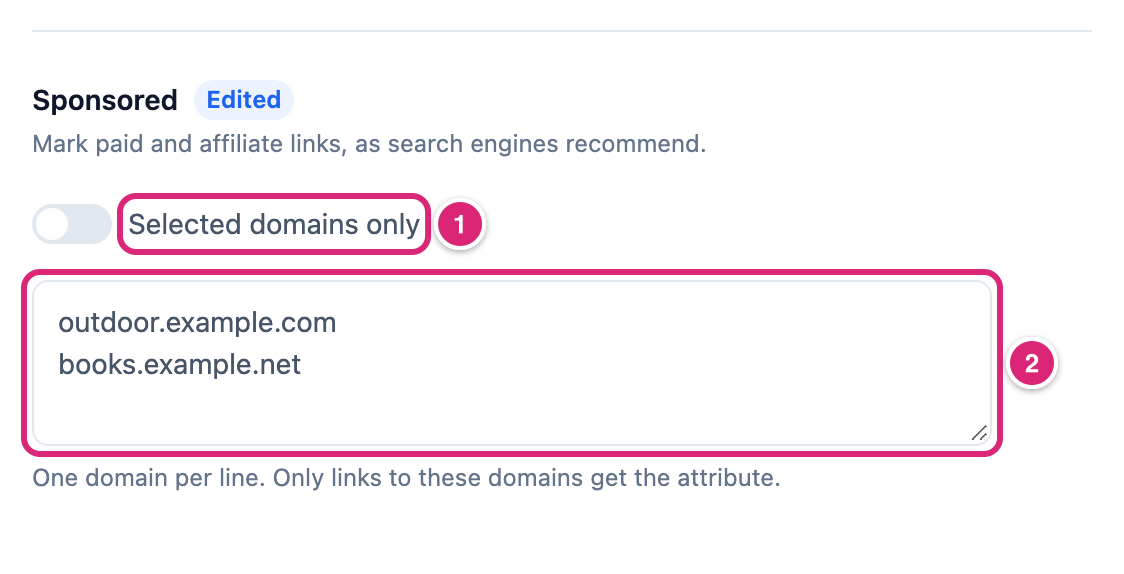
outdoor.example.com also covers www.outdoor.example.com. Another subdomain, like shop.outdoor.example.com, needs its own line.
Then, for each partner you added under Affiliates:
- Go to Link Manager › Affiliates and select Edit (the pencil) on the partner's row.
- Open Link attributes and tick
sponsored. A new affiliate starts withnofollowandnoopenerticked; leave them on. - Select Save changes.
The affiliate's keywords show the change the next time a post is shown. Links masked before keep their old rel.
When you insert a partner link yourself with the editor's Short link button, turn on Sponsored before you select Apply. Nofollow is already on there (Editor tools).
To mark every link to another site sponsored instead, turn Sponsored on (All links). That includes sources you cite and aren't paid for. It still doesn't reach an affiliate's domain when the affiliate has any box ticked: masked links and its keywords take the affiliate's ticks, so tick sponsored on each affiliate too. Turn the switch off to go back to your list, which stays saved.
Set nofollow or sponsored on one short link
A short link's own Link attributes add rel values to two kinds of links: the ones its keywords make, and old shortcodes replaced with it. They don't change masked links or links you inserted with the editor box.
- Select Edit (the pencil) on the link's row. Edit short link opens.
- Turn on Link attributes, and tick
sponsored. Ticknofollowtoo if your Nofollow switch is on Selected domains only and this link's domain isn't listed. - Select Save changes.
These ticks add to the site-wide switches; they can't take a value away. With Nofollow on All links, unticking nofollow here leaves it on the link. Turning the Link attributes switch off only hides the boxes; ticked ones still apply.
A short link's keywords show only while its Replace keywords automatically is on (Auto-linking keywords).
How do you check a link's rel?
Open the published post and look at the link's HTML. The rel value is in the link's tag, for example <a href="https://yoursite.com/link/tent-deal?pid=140" rel="nofollow noopener sponsored">. That's what visitors and search engines get.
- Open the post on your site in a private browser window, so you see the page your visitors get.
- Right-click the link and inspect it in your browser's developer tools. Or open the page source and search for the link's address.
- Read the
rel="..."part of the<a>tag.
- The
?pid=140at the end is the post's ID. Link Manager Pro adds it to short links on your pages, so reports can tell which post sent a click. It isn't part ofrel. - Is an auto-link missing a change you just made? Clear your page cache. Saving a short link or an affiliate clears the cache of supported cache plugins while Clear page cache when links change is on (Integrations settings). Saving the Redirection tab doesn't.
- Is a masked link or replaced shortcode missing it? Those keep the
relthey got when they were written. Change that link'srelin the post's HTML, or insert the link again with the editor box.
How do you undo or change nofollow and sponsored later?
Change the switch or list on the same tab and select Save changes: auto-links follow it the next time a post is shown. Links masked or replaced earlier keep the rel they got, so edit those in the post's HTML.
- To remove a value from a short link's keyword links, untick it under that link's Link attributes. A value your site-wide switch gives stays.
- To remove a value from an affiliate's keyword links and masked links, untick it under the affiliate's Link attributes. Unticking every box hands the domain back to the site-wide switches.
- To take back masking on posts, use the WP-CLI command
unlink. It leaves therelmasking added;--strip-relremoves the wholerel, including values you wrote.
What do nofollow and sponsored tell search engines?
nofollow asks search engines not to pass ranking credit through a link. sponsored marks the link as paid or affiliate. Both are hints in your page's HTML. Each search engine decides how it uses them, and neither Link Manager Pro nor these docs can promise a ranking effect.
- They don't change the redirect. A visitor's click works and is counted the same way, with or without them.
- They can go together:
rel="nofollow sponsored". - For what a search engine does with them, read that search engine's own guidelines.
- A post with a
sponsoredlink counts for the affiliate disclosure, once you turn it on. So does a post that links to an affiliate's domain, directly or through a short link. A link marked onlynofollowdoesn't count. - There's no switch for
ugc, the value for user-generated links. Write it into the link yourself; masking keeps it. WordPress itself addsugcto links in comments, andnofollowas well when they point to another site.
Details
| Setting | Default | What it adds |
|---|---|---|
| Nofollow | On (All links) | nofollow: don't pass ranking credit |
| Noopener | On (All links) | noopener: the opened page can't control yours when a link opens in a new tab |
| Noreferrer | Off (Selected domains only, empty list) | noreferrer: your page address isn't sent to the destination |
| Sponsored | Off (Selected domains only, empty list) | sponsored: a paid or affiliate link |
| Where else | Starts with |
|---|---|
| A new affiliate's Link attributes | nofollow and noopener ticked |
| A new short link's Link attributes | Nothing ticked |
| The editor's Short link and Insert short link boxes | Nofollow on, Sponsored and Open in new tab off. Open in new tab adds noopener |
- A switch that's on (All links) gives the value to masked links, auto-links and replaced shortcodes that go to other sites, and its domain list is grayed out and ignored. On an affiliate's domain with any box ticked, masked links and the affiliate's keywords take the affiliate's ticks instead, whatever the switch says.
- A domain list matches the destination's domain, not your short link's address. Each line is one domain. A leading
www.on the destination is ignored, and the listed lines are cleaned up the same way (case, scheme, path, port,www.). - An affiliate's ticks apply when the destination's domain is exactly the affiliate's domain (
www.aside). - Every row of the Redirection tab is explained on Redirection settings.
Get more out of it
- Keep followed links to the sources you cite. Turn Nofollow off, so it reads Selected domains only, and list your partner domains under both Nofollow and Sponsored. From then on, masked links and auto-links to other sites get only
noopener, while links to listed partners getnofollow sponsoredtoo. For a partner under Affiliates, ticknofollowandsponsoredon the affiliate as well: its ticks win for masked links and its keywords. Links masked earlier keep theirnofollow. - Set the switches before you run Scan posts or replace old shortcodes, along with your affiliates' ticks (for Scan posts) and your short links' ticks (for shortcodes). Those links are written once, with the
relof that moment. - Turn Nofollow off in the editor box for a short link to one of your own pages. The box adds what you tick, even for your own site.
- Start the editor box with Sponsored on for everyone who edits posts. A developer can do that with the
link_manager_pro_picker_toolbar_defaultsfilter (the code). - Pair partner links with the affiliate disclosure. Once it's on, it shows on every post that links to one of your affiliates or has a
sponsoredlink. Anofollowlink alone doesn't bring it (Add an affiliate disclosure).
If something goes wrong
- If you can't type in a domain list, then its switch is on (All links). Turn it off to use the list, and on again to undo.
- If links to a listed domain don't get the value, then check the entry for
https://,www., capitals or a path, and give each subdomain its own line. If the domain belongs to an affiliate, tick the value in the affiliate's Link attributes too. - If a link still has
nofollowafter you unticked it on the short link, then either your Nofollow switch is on All links (a link's ticks only add values), or the link went in with the editor box, AI Link or masking, which the short link's ticks never reach. Edit that link'srelin the post. - If a link to your own page has
nofollow, then it came, for example, from the editor box or AI Link with Nofollow on, from WordPress's Mark as nofollow, or from HTML you or an old plugin wrote. Edit the link in the post. - If the page doesn't show your change, then clear your page cache. Masked links and replaced shortcodes from before the change keep their old
rel: edit those in the post.
More fixes are on Troubleshooting.