
Appearance
AI Link Assistant settings
Connect an AI provider for link suggestions, set a limit on requests, and see what the provider receives.
The AI Link Assistant tab holds the AI provider settings for your WordPress site. You choose where the AI connection comes from, add your own OpenAI, Google Gemini or Anthropic key, turn link suggestions on and limit AI requests per user.
Where to find it
Link Manager › Settings › AI Link AssistantIn the screenshot, the AI Link Assistant tab 1 is open. AI provider 2 chooses where the connection comes from. The API key field 3 is blurred. Max AI requests 4 limits requests per user.
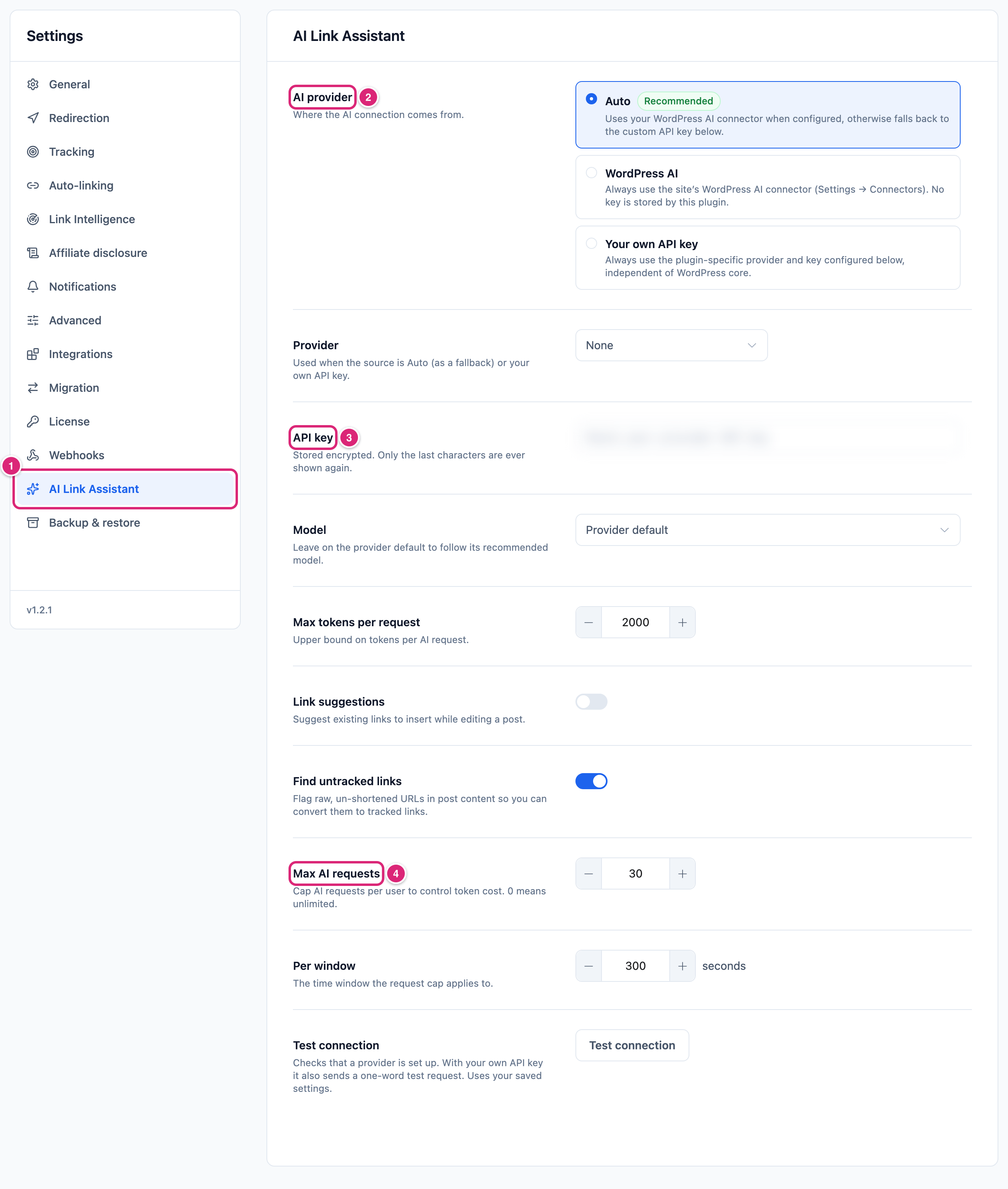
Only administrators see Settings, so only they set the provider and the key. Anyone who can edit posts uses the assistant in the posts they can edit (Access for editors).
Changes take effect when you select Save changes (or press Ctrl+S, ⌘S on a Mac), and Settings saved. confirms it. Until then, each changed row shows Edited, and Cancel puts back the saved values. If saving fails, Couldn’t save. Your edits are kept. appears next to the buttons and Save changes becomes Retry.
Settings and defaults
Each row links to its section below. New sites get the same defaults. Choosing WordPress AI hides the four rows for your own key: Provider, API key, Model and Max tokens per request.
| Setting | Default | Choices | What it does |
|---|---|---|---|
| AI provider | Auto | Auto, WordPress AI, Your own API key | Where the AI connection comes from. More |
| Provider | None | None, OpenAI, Google Gemini, Anthropic | The service your own key belongs to. More |
| API key | Empty | Your provider's key | Stored encrypted. More |
| Model | Provider default | The models listed for that provider | The model your own key uses. More |
| Max tokens per request | 2000 | 256 to 32000 | The longest answer the AI may write for one request. More |
| Link suggestions | Off | On or off | Suggests your short links to insert while you edit a post. Needs a provider. More |
| Find untracked links | On | On or off | Lists links in a post that aren't short links yet. Needs no AI. More |
| Max AI requests | 30 | 0 to 100000; 0 means no limit | How many analyses one user can run in each window. More |
| Per window | 300 seconds (5 minutes) | 1 to 86400 seconds | The length of that window. More |
AI provider: Auto, WordPress AI or your own API key
AI provider decides where the AI connection comes from. It starts at Auto. A connector is WordPress's own shared link to an AI service, set up once for all plugins.
- Auto uses your WordPress connector when one is set up, and your own key otherwise. If a connector request fails, it tries again with your own key, when you've saved a provider and key.
- WordPress AI always uses the connector. Link Manager Pro stores no key, and the connector picks its own model.
- Your own API key always uses the key on this tab, even when WordPress has a connector.
For WordPress AI, your WordPress needs the Connectors screen under Settings. Select Install on a connector there and add its key. Without a connector, suggestions don't run.
Connect your own OpenAI, Gemini or Anthropic API key
To use your own key, pick the provider, paste the key and save. Then test it.
Link Manager › Settings › AI Link Assistant- Under AI provider, choose Your own API key. Auto uses the same key whenever WordPress has no connector set up.
- Choose your service in Provider: OpenAI, Google Gemini or Anthropic.
- No key yet? Get your API key under the field opens your provider's key page.
- Paste the key into API key.
- Leave Model on Provider default, or choose a model from the list.
- Select Save changes.
- Select Test connection. Connected means your provider accepted a test request.
Each provider has its own default model and list:
| Provider | Provider default | Models in the list |
|---|---|---|
| OpenAI | gpt-4o-mini | GPT-4o mini, GPT-4o, GPT-5.6 Luna, GPT-5.6 Terra, GPT-5.6 Sol |
| Google Gemini | gemini-2.5-flash | Gemini 2.5 Flash, Gemini 3.5 Flash, Gemini 3.1 Pro, Gemini 3.1 Flash-Lite |
| Anthropic | claude-haiku-4-5-20251001 | Claude Haiku 4.5, Claude Sonnet 5, Claude Opus 4.8, Claude Fable 5 |
The tab shows that model in brackets. When you change Provider, a Model the new provider doesn't list goes back to Provider default.
For a technical reader: your server calls api.openai.com, generativelanguage.googleapis.com or api.anthropic.com directly and waits up to 30 seconds. With a Gemini Flash model, Link Manager Pro turns the model's thinking off. The link_manager_pro_ai_models, link_manager_pro_ai_models_{provider} and link_manager_pro_ai_default_models filters change the lists and defaults.
How the API key is kept
Link Manager Pro stores the key encrypted and never sends it back to your browser.
- After a reload, the field holds a stand-in: the eye icon shows
lmpro_masked:and the key's last four characters. Leave it as it is to keep the key; a value starting withlmpro_masked:is ignored on save. - To replace the key, clear the field, paste the new one and save. To remove it, clear the field and save.
For a technical reader: the key is encrypted with AES-256-CBC, using a key made from the AUTH_KEY in your wp-config.php. If that value changes, enter the key again. Backup files carry the key in this encrypted form. Restoring settings on the same site, with the same AUTH_KEY, brings it back. A backup from another site leaves this site's key as it is (Back up and restore).
Max tokens per request
Max tokens per request sets the longest answer the AI may write for one request. AI providers count text in tokens, small pieces of words. It's 2000 by default and takes 256 to 32000. It doesn't limit what's sent: the post text has its own limit of 8,000 characters.
The assistant asks for at most eight suggestions, a short answer. Raise the limit for a model that reasons before it answers: it can spend the whole budget thinking and return no text. With WordPress AI, the saved value still goes to the connector, when it supports a limit.
Link suggestions and Find untracked links
The two switches turn on the two parts of the AI Link Assistant in the post editor. Find untracked links is on by default and needs no AI; Link suggestions is off by default and needs a provider.
- Find untracked links lists a post's plain links under Links to shorten, so writers can turn them into short links. Your own site checks the post; nothing goes to an AI provider. It lists up to 50 links, skipping dismissed links, short links and your site's
/wp-admin/,/wp-content/,/wp-includes/and/wp-json/addresses. - Link suggestions asks the AI which of your short links fit the post, and where. It runs only when someone selects Analyze content, or AI Link on selected text. The address a suggestion inserts follows your prefixes: a short link to an affiliate's domain uses the Affiliate link prefix when you set one (General settings). So does a link that Links to shorten converts.
With no provider, administrators see Set up an AI provider to get suggestions. with Open AI settings; others see Ask an administrator to set up an AI provider to get suggestions. With both switches off, the AI Link Assistant panel doesn't appear in either editor. The AI Link button for selected text is hidden while Link suggestions is off. Using it in a post: AI Link Assistant.
Max AI requests and Per window: the AI request limit
Max AI requests caps how many link-suggestion analyses one user can run in each Per window period. By default, that's 30 every 300 seconds (5 minutes) per user. Set Max AI requests to 0 to remove the limit.
- It counts per WordPress user, from their first counted analysis until Per window seconds later. Three editors can each run 30 in the same 5 minutes.
- Suggestions are saved on your site for an hour. The same unchanged text analyzed again in that hour, with the same provider, model and Max tokens per request, reuses them and doesn't count.
- Every other analysis that sends a request to the provider counts. An analysis with no matching short link, or with an empty post, sends nothing and doesn't count. These never count: Find untracked links, Test connection, attempts while Link suggestions is off or no provider is set up, and attempts while you're over the limit.
Over the limit, a writer sees Couldn’t analyze the content. Try again. (with AI Link: Couldn’t get AI suggestions. Try again later., plus plain short link matches when the search finds some, or No matches found.) until their window ends.
What Test connection checks and sends
Test connection checks your saved settings, not the ones on screen, so save first:
- With your own key (Your own API key, or Auto without a connector), it sends one request asking the model to reply with the single word "ok", in up to 256 tokens. No post content or short links go with it. It shows in your provider account's usage.
- With a connector (WordPress AI, or Auto with a connector set up), it sends nothing and only checks that a connector is set up.
The result appears under the button:
- Connected, with a line like
Source: Your own API key · Provider: OpenAI · Model: GPT-4o mini. For a connector, it showsWordPress AI, the connector's ID (or its name when it is OpenAI, Google Gemini or Anthropic), andSite default. - Not connected, with No AI provider is set up yet. (no provider, or no key) or The provider didn’t accept the test request. Check the API key and model, then try again.
- Couldn’t test the connection, for example after 10 tests in 5 minutes: Too many test attempts in a short time. Please wait a moment and try again.
What does the AI provider receive?
Link Manager Pro sends the post's text and a list of matching short links to the AI provider. That happens when someone selects Analyze content in a post, or AI Link on selected text. Nothing goes to a provider when you save this tab or when Find untracked links checks a post. Each request contains:
- The post's text, as it is in the editor at that moment, unsaved changes included. HTML is removed, and only the first 8,000 characters go. The post title isn't sent.
- The selected text, when someone uses AI Link on a selection.
- Up to 50 of your short links that match the post. For each one: its slug, its Destination URL and up to eight of its keywords.
- Fixed instructions that tell the model how to answer.
Only short links that work for anyone can be in that list. Short links that are expired, scheduled or protected by a password are never sent, and neither is the short link behind a redirect. If no short link matches, nothing is sent and no suggestions appear.
For a technical reader: a short link matches when its slug, destination or keywords contain one of the post's 15 most frequent words, or the selection's. Only words of four or more letters count, skipping numbers and common English words. Matches for the selected text come first, then the rest, each ranked by click count, before the cut to 50. Text without spaces between words, such as Chinese or Japanese, isn't split into words. Each phrase between punctuation counts as one word, so these posts rarely find a match.
What's never sent: click counts, visitor data (IP addresses, countries, cookies) and the text of other posts. Your API key goes only to your own provider, as its sign-in. By default, the request also carries your site's address, as WordPress requests do.
With your own key, the request goes straight from your server to that provider; with WordPress AI, through the connector. With Auto, if the connector request fails, the same content goes again to your own key's provider, when you've saved a provider and key. What a provider does with it depends on its own terms.
Link Manager Pro adds a note about this to the WordPress privacy policy guide, under Settings › Privacy. It's guidance for writing your own policy, not text to copy (Privacy and personal data).
Get more out of it
- Try suggestions without a new key. If WordPress already has a connector under Settings › Connectors, leave AI provider on Auto and turn on Link suggestions. No second key is stored.
- Set a cap that fits your team. Each writer gets their own Max AI requests, so the site's total grows with every writer. With many writers, a lower number such as 10 per 300 seconds keeps each one's share small.
- Give the AI better short links to choose from. It only picks short links that share words with the post, so clear, descriptive slugs help. Keywords count too. That field shows only under Replace keywords automatically, which also links those words in your posts (Auto-linking keywords). To add keywords without that, turn it on, type the keywords, turn it off again and save: the keywords are kept.
- Leave Find untracked links on, even without AI. Writers can turn a post's plain links into short links, so their clicks are counted.
If something goes wrong
- If Test connection shows No AI provider is set up yet., then check that Provider isn't None and that a key is saved. With WordPress AI, install a connector under Settings › Connectors and add its key.
- If Test connection says the provider didn't accept the test request, then check the key in your provider account, and that it belongs to the chosen Provider. After you change Provider, Model is already Provider default; choose a model only if you want a specific one.
- If the test stopped working after the security keys in
wp-config.phpchanged, then paste the API key again and save. - If writers see Couldn’t analyze the content. Try again., then they may be over Max AI requests. Wait for their window to end, or raise the limit. If it keeps happening, select Test connection.
- If writers see Couldn’t get AI suggestions. Try again later., then the provider refused or gave no usable answer, or (with AI Link) the writer is over the limit. Select Test connection; for a model that reasons first, raise Max tokens per request. The browser console shows the provider's message after
[Link Manager Pro] AI suggestions failed:. - If a new short link doesn't show up in suggestions, then the post's earlier suggestions may still be saved. They're kept for an hour, unless the post text changes first.
More fixes are on Troubleshooting.