
Appearance
Other addresses and conflicts
Keep old link addresses working after a migration, understand what each status means, and fix an address conflict.
Other addresses are extra paths on your site that open a short link, besides its own /link/<slug> address. Most are old link addresses kept after a migration from Pretty Links, ThirstyAffiliates or BetterLinks, like /recommends/deal. You can add your own too. An other address opens its short link only when nothing else on your site answers that path. When something does, the address is in conflict. You decide who keeps it.
What happens to old link addresses after migration?
The import keeps each old link address as an other address of the short link it made. Once the old plugin is off, a visit to yoursite.com/recommends/deal opens the short link deal. That holds as long as no short link, redirect or page on your site uses that path.
- Imported addresses show a badge with the plugin's name, for example From ThirstyAffiliates.
- While that plugin is still active, Link Manager Pro leaves its addresses to it.
- A path that's already this link's own short address, like
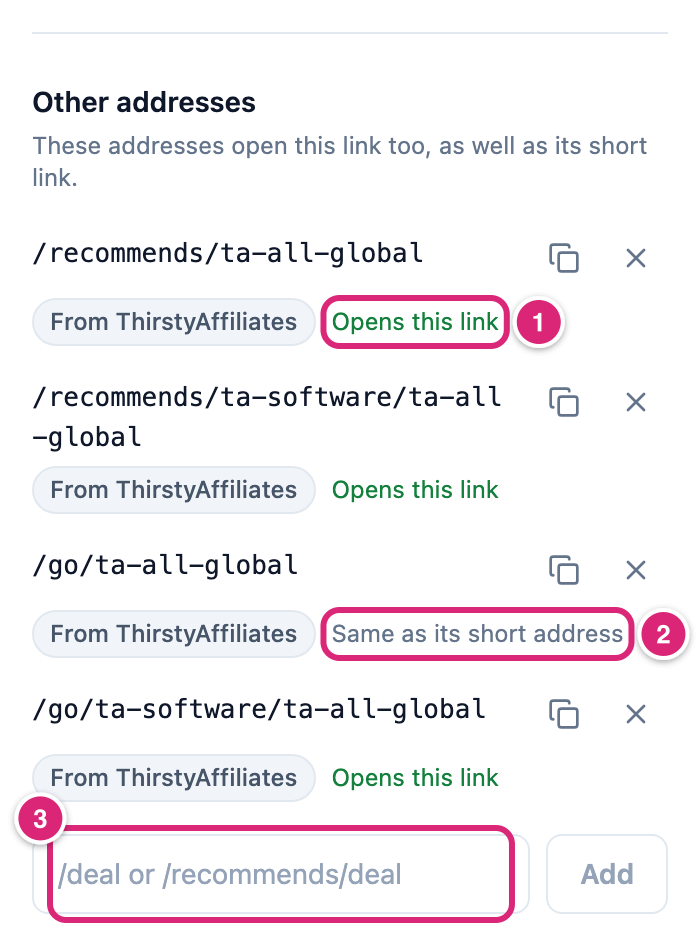
/go/dealfor the linkdeal(gois the default Internal link prefix), isn't a conflict. It shows Same as its short address and works whenever the link does.
How each plugin's addresses come over is on its own page: Pretty Links, ThirstyAffiliates, BetterLinks.
Where you see other addresses
Other addresses show in four places: the link report, the Short Links list, the Address conflicts tab and the Dashboard.
Link Manager › Short Links- In the link report: select a link in the list to open its report. The Link details card has an Other addresses section, above the QR code. It shows every address, the plugin it came from, what a visit gets today, and a field to add one. The status there is worked out each time you open the report.
- In the list: under a link, "+4 addresses" tells you it has other addresses. When some open something else, it reads "1 address opens something else" instead, in orange.
- On the Address conflicts tab: it lists the links with at least one address in conflict. The tab shows only while there's at least one (it stays while you're on it).
- On the Dashboard: Needs attention shows Other addresses open something else (Other address opens something else when there's one) with the number of addresses in conflict. Select the row (it shows Review when you point at it) to open the Address conflicts tab.
The search box in Short Links also looks in other addresses. Searching for /recommends/deal, or part of it, finds the link. The search matches the address path only.
How is a visit to an other address answered?
Link Manager Pro checks an address in a fixed order, and the first match answers the visit. An other address comes fourth, so a live short link, an active redirect or a page at the same path wins over it.
- A short link's own address:
/link/deal(or/go/dealunder your Internal link prefix, or the same slug under your Affiliate link prefix when you set one) opens the short linkdealwhile it's live. A previous prefix opens it too (General settings). That address stays with its short link even while the link is scheduled or expired: no other address opens there meanwhile. - A redirect: an active redirect for that path answers, even if a page exists there too. A paused redirect doesn't count.
- Content WordPress finds: a published post, page or archive (a list of posts, such as a category page) at that path shows as usual. An attachment page doesn't count, so an other address still opens over it. That's the page WordPress makes for a single uploaded file.
- The other address: the short link that has the address opens it. If two links have the same address, the one that got it first keeps it. It keeps it even while that link is scheduled or expired. While the plugin the address came from is active, Link Manager Pro skips this step and leaves the address to the plugin.
- WordPress: when nothing above matched, WordPress answers as usual, normally with its 404 page.
An example: a reader opens yoursite.com/recommends/deal after you moved from ThirstyAffiliates and turned it off. No short link, redirect or post uses /recommends/deal. So step 4 sends the visitor on with the short link's Redirect type, say 301. The click counts on deal like any click on it. Later you publish a page at that same path. From then on, step 3 shows the page and the link report shows A page uses this address. The Dashboard counts 1 address that opens something else.
An other address works like its short link
A visit through an other address gets exactly what the short link gives, and it's counted the same way, never also as an internal click.
- The same Redirect type, password page, routing rules and forwarded query parameters apply.
- The click counts toward that short link in reports.
- A scheduled or expired link sends nothing through its other addresses either. WordPress answers instead, and the card shows Doesn’t open while this link is scheduled or expired.
- Letter case doesn't matter, and neither does a slash at the end or a query string (the part after
?). So/Recommends/Deal/?ref=mailmatches/recommends/deal. - When an other address is another short link's own address, like
/go/dealunder the Internal link prefix,/GO/Dealopens that short link too, while it's live. When it's this link's own address (Same as its short address), the same holds once the old plugin is off.
Deleting a short link removes its other addresses with it. The delete message says so ("Its 4 other addresses stop working too.").
What each status means
Each address on the card has one status, the answer a visit gets right now. The orange ones are conflicts: something else answers the address.
| Status | What it means | What you can do |
|---|---|---|
| Opens this link (green) | The address opens this short link | Nothing to do |
| Same as its short address | The address is this link's own address under your Short link prefix, Internal link prefix or Affiliate link prefix | Nothing to do. It works whenever the link is live |
| "Pretty Links answers it while it’s active" (or ThirstyAffiliates, BetterLinks) | The plugin the address came from is still running, so Link Manager Pro leaves the address to it | Turn that plugin off when you're done with it (Migrate to Link Manager Pro) |
"Opens short link deal" (orange) | Another short link has this path as its own address, whether that link is live or not | Change that link's slug, or select Keep the other or Remove. Send it here isn't offered |
"Opens a redirect to https://example.com/" (orange) | An active redirect answers the address | Send it here, Keep the other or Remove |
| "A page uses this address: Deals" (orange) | A published post or page, or an archive (a category, tag or other public term, a post type archive or an author archive), is at that path. Edit page opens the post, page, term or author in WordPress, in a new tab. A post type archive has no edit link | Change the page's slug, or select Keep the other or Remove |
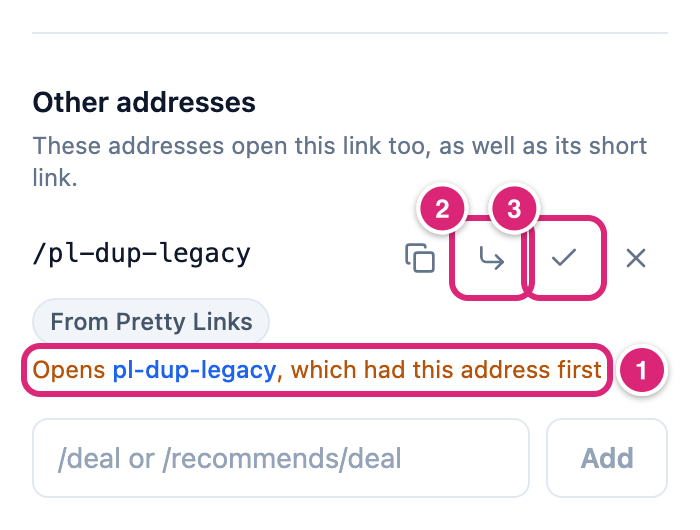
"Opens deal-2, which had this address first" (orange) | Another short link got the same other address earlier | Send it here, Keep the other or Remove |
| Doesn’t open while this link is scheduled or expired | The link isn't live, so nothing is sent | Change Starts or Expires under Schedule & access in the link dialog (Create and edit a short link) |
| Can’t be used | The path can't work on your site any more, for example it's now one of your short link prefixes on its own | Remove it |
The slug or redirect named in a status is a link: select it to open that link's or redirect's report. Each address row also has a Copy icon, labeled Copy address. It copies the address and shows Address copied. After Keep the other, the status gets "· kept as it is" at the end. It stays orange but stops counting as a conflict.
The card looks for one published post, page or other public content type at the path, but not an attachment. Archives win too (step 3 above): a category, tag or other public term archive, a post type archive or an author archive. The card then shows A page uses this address with the archive's name, and the address counts as a conflict.
Fix a short link address conflict
You fix a conflict from the link's report, with the small icon buttons on the address's row. Point at an icon to see its name.
Link Manager › Short Links- Select the Address conflicts tab, or select Other addresses open something else under Needs attention on the Dashboard.
- Select a link to open its report.
- Under Other addresses, find the orange status and read what holds the address.
- Decide who should get it, and select its button:
- Send it here (arrow icon): this link takes the address. Offered only when a redirect or another link's other address holds it.
- Keep the other (check icon): leave the address to what answers it now, and stop counting it as a conflict.
- Remove (cross icon): take the address off this link.
WARNING
Send it here can't be undone. A redirect that held the address is deleted, with its hit history. Another link that held it loses the address. Back up first if you might want either back (Backup and restore).
- If you chose Send it here, read the confirmation. It names what loses the address. Select Send it here to go ahead.
- If you chose Remove, confirm with Remove. The address stops opening this link.
Keep the other asks no question, because it changes nothing for visitors: you can still use Send it here or Remove later. The address counts as a conflict again only if something different takes it, for example a redirect after the page that held it is gone.
To see the site addresses Link Manager Pro has recorded, for example after a domain move, go to WordPress's Tools › Site Health › Info. The Link Manager Pro redirects section lists them as Addresses this site has had. These are your site's own addresses, not other addresses of short links.
To free an address a page or another short link holds, change that page's or link's slug. The address then opens this link without any other step.
Add or remove an address
Add an address when you want another path on your site to open a short link, for example a short spoken address like yoursite.com/deal.
- Open the link's report from Link Manager › Short Links.
- Under Other addresses, enter a path like
/deal, or a full address on your site. - Select Add.
The address is saved even when something else answers it today, and its status tells you. It starts opening the link once that other answer goes away. Anyone who can manage short links can add and remove addresses and use Send it here (Access for editors).
| Rule | Detail |
|---|---|
| Most per link | 25 other addresses ("A link can have up to 25 other addresses.") |
| Where | A path on your site, or a full address on its domain (with or without www.) |
| Not allowed, for example | WordPress's own paths, such as /wp-admin/..., /wp-json/..., /wp-login.php or /robots.txt; your home page /; a short link prefix on its own, like /link; . or .. in the path; paths over 2,000 bytes |
| Its own address | Refused: "That is already this link’s short address." |
| Letter case and query string | Matched in any letter case; anything after ? or # is left out. The card keeps your letter case and shows only the path |
To remove one, select Remove (the cross icon) on its row, then Remove again. An address you remove stays removed. A later import from the same plugin never adds old addresses again to a link it already kept addresses for. To bring one back, add it by hand.
When conflicts are checked again
The card in the link report shows the current status each time you open it. The counts in the list, the Address conflicts tab and Needs attention are updated when something changes on your site, and once a day.
They're updated:
- when you save a short link or a redirect whose address another link has as an other address. A warning names it, for example "/deal also opened deal-2; it now opens this link." A paused redirect gives no warning, and turning a redirect on from its report shows it. A scheduled or expired short link still warns, in other words: "/deal also opened deal-2; it now belongs to this link, which isn’t live, so it opens nothing for now." The link's own address still wins.
- when a public category, tag or other public term is created, renamed, re-slugged or deleted: the link whose other address that term's archive takes is checked again, at the old and the new address.
- when you delete a short link or change its slug: its own entry, and other links whose address its old short address was blocking.
- when a post or page is published, or a published one gets a new slug or parent, or is unpublished or trashed.
- for all links, shortly after an import, a restore from a backup, or a change of Short link prefix, Internal link prefix or Affiliate link prefix.
- for all links, when Pretty Links, ThirstyAffiliates or BetterLinks is activated, deactivated or deleted.
- for one link, after you add an address to it or use Send it here, Keep the other or Remove.
- once a day, for up to 300 links with addresses. The next day continues where it stopped. On a site with more such links, a full pass takes several days.
Other changes reach the counts only at the daily check. That includes deleting a redirect, but no longer category and tag changes. The card in the link report is current all the same.
The full and daily checks are WordPress scheduled tasks. They run when someone visits your site, unless your host runs them on a timer.
Get more out of it
A few habits keep old addresses working and the conflict list short.
- Before you delete a link, look at its Other addresses: they're deleted with it. To keep one working, add it to the replacement link afterwards.
- Give a printed or spoken address its own path. Add
/dealto the short link for a podcast or flyer, andyoursite.com/dealworks without the prefix. If the card then shows A page uses this address, pick another path. - Use Keep the other on purpose. When a page really should own an old path, select Keep the other. The Dashboard stops counting it, and it shows up again if the address changes hands.
- See conflicts before you turn the old plugin off. While it's active, its addresses show that it answers them, and conflicts behind that aren't counted. The import's Link check asks as if the plugin were already off. Read its list of addresses that open something else first (Read the result).
If something goes wrong
- If an old address opens a page instead of its short link, then a page on your site uses that path. The page wins. Change the page's slug. Or select Keep the other if the page should keep it.
- If an old address shows WordPress's 404 page but the card says Opens this link, then clear your page cache. Try again in a private window.
- If an old address shows an archive, such as a category page, then the archive wins, and the card shows A page uses this address with its name in orange. Rename the category, tag or author slug, or select Keep the other.
- If the card says the old plugin answers the address although you turned it off, then its code still runs on your site. Check Plugins for another active copy. On a multisite network, check whether it's network-activated.
- If the Address conflicts tab still lists a link you fixed, then open its report: the card shows the current status. The count catches up at the next check (when conflicts are checked again).
- If Add says to use a path on this site, then the path can't be an address. It's one of WordPress's own, a short link prefix on its own, or on another domain.
More fixes are on Troubleshooting.