
Appearance
Fix orphaned posts
Find posts that no other post links to, then link each one you want readers to reach from a related post.
To find orphaned posts in WordPress with Link Manager Pro, scan your posts in Link Audit and open the Orphaned tab. Then give each post you want readers to reach a link from a related post, with Suggest links or by hand.
An orphaned post is a published post or page that no other post or page on your site links to. Readers who move from post to post never get there. What counts as a link, and what doesn't, is on the Link Audit page.
Before you start
- You need access to Link Manager Pro. Administrators always have it, and editors only when an administrator allows it (Access for editors).
- Adding a link edits the other post, so you need permission to edit that post in WordPress.
- WordPress keeps a revision of a post before Insert link changes it, but only while revisions are on for your site. For a copy you control, back up Posts and pages first (Back up and restore).
Find and fix orphaned posts in WordPress
You scan once, open the Orphaned tab, and fix one post at a time from its Suggest links drawer. The scan only reads your posts. Only Insert link changes anything: it edits the suggested post you select it on, not the orphaned post.
Link Manager › Link Intelligence › Link AuditSelect Scan all posts at the top right. Keep the page open until Scan complete. shows. On a site that has never been scanned, the same button also sits under Find posts nothing links to.
Select the Orphaned tab. It lists every published post and page with
0under Inbound. To find one post, search by its title.Pick a post that readers should be able to reach from your other posts (which ones to fix).
On its row, select Suggest links (the light bulb icon). A drawer lists up to 10 other posts that share words with its title, each with a match badge 1.
Check each suggestion before you use it. Is that post about a related topic? Does its Anchor text 2, the words that will become the link, describe your post? If not, change the anchor text or skip the suggestion.
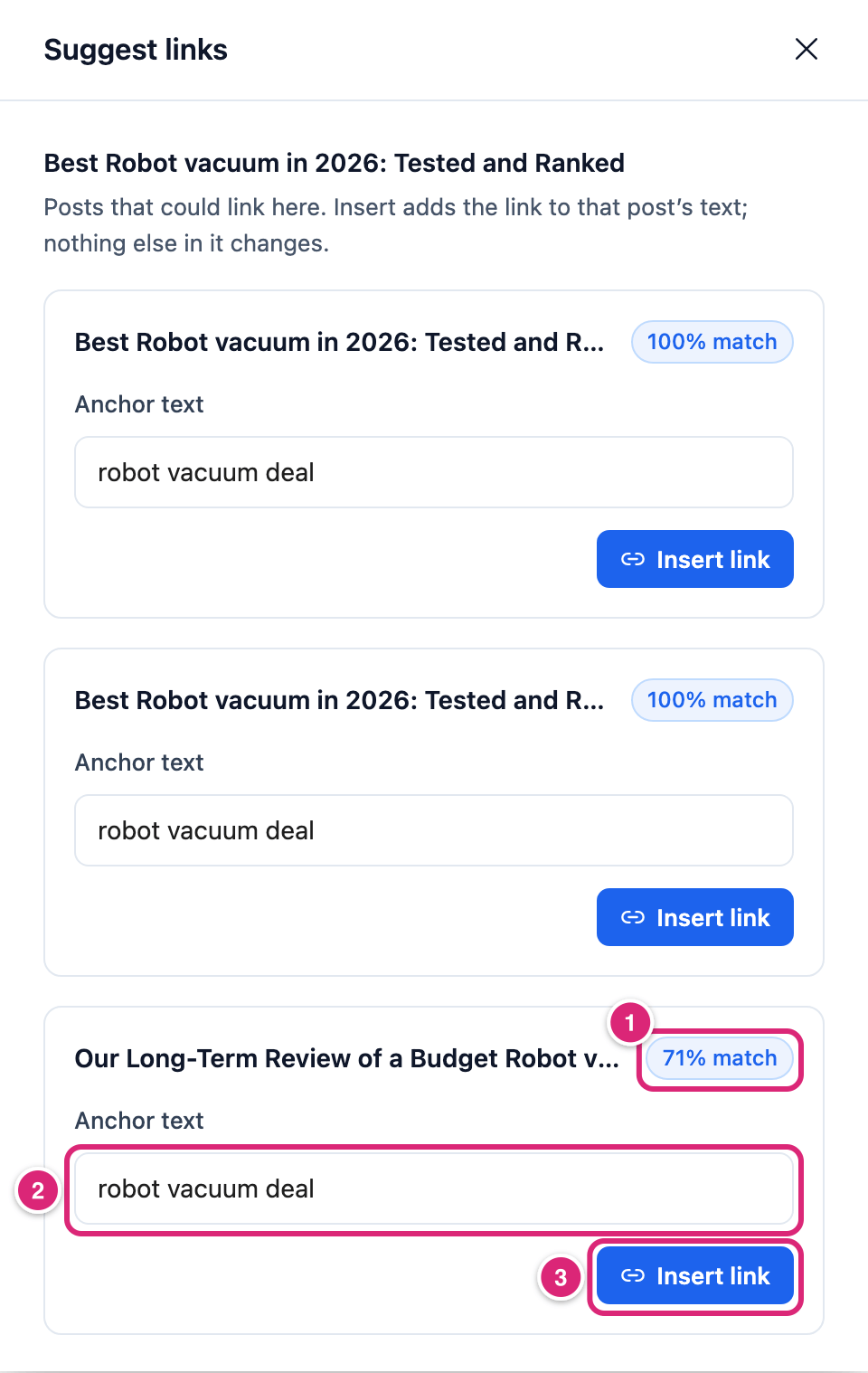
Suggest links for a robot vacuum post: posts that share its title words, the closest match first. WARNING
Insert link edits the other post at once, with no undo button. To take the link out again, edit that post, or restore its revision from before the change.
Select Insert link 3 on a suggestion that passes your check. The card then shows Linked.
Add more links the same way if other suggestions pass. With the default minimum, a post needs 3 posts linking to it before it can stop being Weak.
Close the drawer. The list and the cards refresh, and both posts are counted again.
A suggestion has to share at least two of your title's words, or the one word when the title has only one. Common words like "best", "guide" and "review" are ignored, and so are numbers such as a year. Words are matched whole, and a post that matches more words, or matches them in its title, scores higher.
The match badge compares each suggestion with the top one, so the top one always shows 100% match. It isn't a quality score. How suggestions and anchor texts are picked is on Link Audit.
When you change the anchor text, type words that appear in that post's plain text, outside any link. Letter case doesn't matter. A phrase that runs across a link or any formatting, like bold or italic, doesn't match. Copy the words from the post editor, not the live page: the page can show curly quotes where the post has straight ones.
Which posts with no internal links should you fix?
Fix the orphaned posts you want readers to find from your other posts. Some posts are better merged into another one, and some are meant to have no links from your posts at all. Link Audit lists them all the same way, so the choice is yours.
- Link it. A post that's still useful, with other posts on the same topic. Link to it from two or three of those posts, at the point where a reader would want more. Links you place by hand in related posts often read better than any suggestion.
- Merge it. Two posts that cover the same thing. Move what's useful into the stronger post and move the weaker one to the trash. Then redirect its old address to the stronger post (Redirect an old URL). Once the post isn't published any more, its row leaves Link Audit.
- Leave it. Pages people reach another way, like a landing page for an ad, a thank-you page after a form, or a page in your menu. Link Audit doesn't count menus and has no way to leave a post out. So these pages stay on the Orphaned tab and in the score. Skip their rows.
Add a link by hand
When no suggestion fits, add the link in a related post yourself. Saving that post counts the new link. It's also how you add internal links to older posts, which Suggest links may not look at: it reads up to 300 of the newest published posts that contain one of your title's words.
- Open the related post in the WordPress editor. If it's in the Link Audit list, Edit the post on its row opens it in a new tab.
- Select a phrase that describes the orphaned post and add a link. In WordPress's link box, start typing the orphaned post's title and pick it from the list. Then save the post.
- Back in Link Audit, reload the page. The orphaned post's Inbound is up by 1.
Saving a published post adds 1 to the Inbound of each post it starts linking to, and takes 1 off each post it stops linking to. This works for the posts it links to that already have a row in Link Audit. Rescan on the orphaned post recounts its own Inbound too, and Scan all posts recounts every post at once.
If Mask links when saving posts and Mask internal links are both on, saving can turn your new link into a short link. Link Audit still counts it as a link to the orphaned post, because short links count by where they lead (Short links in your posts). The same can happen to a link from Insert link the next time someone saves that post.
How do you check that an orphaned post is fixed?
An orphaned post is fixed once its Inbound shows 1 or more. It then leaves the Orphaned tab, and the Orphaned posts card goes down by one. With one link and the default minimums, its Status is Weak, not Healthy. That's expected.
- To see the link, open the other post on your site. The anchor text is now a link to your post.
- With the defaults, a post is Healthy when 3 or more posts link to it. It also needs 2 or more links of its own to your pages. Both minimums are under Link Manager › Settings › Link Intelligence (Link Intelligence settings).
- The Coverage score may barely move. It loses points in proportion to the share of your audited posts that are orphaned or weak, so on a large site one fixed post is a small share. The score is rounded to whole points (how the score works). The Orphaned posts and Weak posts cards show your progress better.
How do you undo or change an internal link?
Edit the post that holds the link, then remove the link or change its address, and update the post. Or restore its revision from before Insert link, while revisions are on. Saving that post takes 1 off the Inbound of the post the link pointed to.
Details
What Insert link does to the other post:
- It turns the first place the anchor text appears outside a link into a link to your post's normal address (its permalink). The words keep their letter case as written, and nothing else in the post changes.
- It saves the post through WordPress, which keeps a revision of the earlier text first while revisions are on.
- It counts both posts again straight away.
- It doesn't make the link a short link.
- It saves nothing when it can't add the link, and a message under Anchor text says why. For example:
- the words aren't in the post any more, or they're already a link
- the post changed meanwhile
- you can't edit that post (You can’t edit that post.)
- WordPress would remove some of the post's content when your account saves it
Where suggestions come from:
- Only published posts and pages that contain one of your title's longest words are looked at, newest first, up to 300. An older post that would be a good source may not show up, so link from it by hand.
- A title word counts when it has three letters or more. Common words like "the" or "with", generic words like "best", "guide" and "review", and numbers are ignored.
- Titles split on hyphens, and accented and non-Latin letters stay. Words match as whole words.
- A suggestion shares at least two title words, or the one word when the title has only one.
- A post that already links to yours isn't suggested.
Get more out of it
- Fix new posts the day you publish them. Publishing a post counts its links, so a new post shows on the Orphaned tab right away. Open Suggest links on it while you still know which older posts are related. Related posts that are much older may not show up there, so link from those by hand.
- Give the post links of its own. Healthy also needs 2 links from the post to your other pages, with the default minimum. Select Edit the post on its row and link to related posts. That raises their Inbound when you save the post.
- Start where it counts. Search the Orphaned tab for your key posts, like a buying guide or a top review, before working down the list. The Dashboard's Needs attention card shows the same count. Its Suggest links button opens Link Audit on the Orphaned tab (Dashboard).
- Don't count on keywords for this. Links that Auto-linking adds while a page is shown aren't in the saved post, so Link Audit doesn't count them. A post linked only through a keyword stays Orphaned.
- Know what click tracking shows. Track clicks on internal links gives one running total, Internal link clicks on the Dashboard, not a count per link or per post. To see clicks on one internal link, make it a short link (Clicks on links to your own pages).
If something goes wrong
- If the drawer shows No suggestions for this post, then most likely none of your newest posts uses enough of the title's words in its title or text. A title with only common, generic or very short words gets none either. Add a link by hand.
- If a message shows under Anchor text after Insert link, then nothing was saved. Do what it says: pick words that are still in that post and not already a link, or ask someone who can edit that post.
- If a post still shows as Orphaned after you linked to it by hand, then check that the post holding the link is published and saved, then reload the page. If the link came in outside the editor, select Rescan on the post that holds it or on the orphaned post, or Scan all posts.
- If a page your menu links to shows as Orphaned, then that's expected: menus, widgets and footers aren't counted. Link to it from a post if you want it counted.
- If the Coverage score didn't go up after your fixes, then check the Orphaned posts and Weak posts cards instead. The score is a share of all audited posts, rounded to whole points, so a few fixes on a large site may not change it.
More fixes are on Troubleshooting.