
Appearance
Migrate from BetterLinks
See how BetterLinks links, clicks, passwords, geo rules and Simple 301 redirects map over, and what a later import adds.
When you migrate from BetterLinks, each link the import can bring over becomes a short link, and its old address keeps opening it. Its clicks, password, categories and geo or time redirects come along when you tick those items. Page redirects from BetterLinks' Simple 301 Redirects importer become Redirects.
Looking for a BetterLinks alternative? Link Manager Pro imports your BetterLinks links, clicks, passwords and redirects, and keeps their addresses working.
Can you replace BetterLinks and keep your links working?
Yes, for every link the import brings over. BetterLinks answered each link at its own path, for example yoursite.com/out/deal. The import makes a short link for it, like yoursite.com/link/deal, and keeps /out/deal as one of its other addresses. Once BetterLinks is off, /out/deal opens the short link, as long as no page, redirect or other short link on your site uses that address.
The steps are the same for every plugin, on Migrate to Link Manager Pro. You import under Link Manager › Settings › Migration: under Import from, choose BetterLinks. It can be active or deactivated, as long as its data is still in your database.
There's no shortcode step: Old shortcodes in your content looks only for Pretty Links and ThirstyAffiliates shortcodes.
What you can import from BetterLinks
The BetterLinks import offers nine items. Each shows how many it found, and an item with nothing to import shows (0) and can't be ticked. Affiliates is the exception: it shows how many new domains it suggests out of all it found, and can be ticked whenever it found any.
| Item | What it becomes |
|---|---|
| Short links | One short link per BetterLinks link, with its old address kept. Page redirects become Redirects (see below) |
| Categories | Categories with the same names, added to the imported links. BetterLinks' "Uncategorized" and Simple 301 Redirects categories aren't imported |
| Tags | Tags with the same names, added to the imported links |
| Click history | Each recorded click, on its short link or redirect |
| Passwords | The link's password, as Password protection |
| Auto-linking keywords | The link's keywords, with auto-linking switched on for that link |
| Geo rules | Routing rules for country and time-period redirects, and for expiry fallback addresses |
| Settings | Up to three BetterLinks settings, counted only when they would change yours. Never ticked to start with (see below) |
| Affiliates | An affiliate for each destination domain you tick |
Read the counts as what BetterLinks holds, not as what comes in:
- The Short links count includes page redirects, and links that aren't imported, such as ones whose destination isn't a web address.
- The Geo rules count is the links that get rules, including links whose only routing is an expiry fallback address (see below). Country names are looked up the way the import looks them up, so a link whose countries can't be read isn't counted. Links with rotation, split tests or only device redirects are left out.
A category or tag that already exists with the same name is reused. On the affiliates step, some domains are suggested. Their links were marked sponsored in BetterLinks, carry a parameter like tag=, or use an address like partner.example.com.
How a BetterLinks link maps over
Each BetterLinks link keeps its destination, created date and main options. What has no place in Link Manager Pro gets a note (see below).
| In BetterLinks | In Link Manager Pro |
|---|---|
Short URL with BetterLinks' prefix, like go/deal | Slug deal. The full path /go/deal becomes an other address, marked From BetterLinks |
Short URL with another prefix or several parts, like out/deal or go/2024/deal | Slug deal, its last part |
| Slug that another link already has | The whole path with dashes, like go-deal or go-2024-deal, then -2, -3. The old address still works |
| Slug over 64 characters | A shortened slug that ends in six letters and digits |
| Target URL | Destination URL. A target with no scheme gets http://, and a target that starts with / gets your site's address |
| Redirect type | 301, 302 and 307 kept. Cloaked (BetterLinks Pro) becomes 307 and isn't cloaked. None or any other becomes 302. Each change gets a note |
| Nofollow and sponsored | The link's nofollow and sponsored ticks |
| Parameter forwarding | Forward query parameters |
| Title and note | Name and Note in the link report |
| Created date | The same Created date |
| Scheduled | Starts on its scheduled date |
| Draft | Switched off: it expires at the moment of the import, with a note |
| Expiry date, switched on | Expires on that date. With a fallback address, a routing rule instead (see below) |
Imported links start with auto-linking off, unless you import their keywords, and those keywords wait until BetterLinks is switched off. To check one link, open its report from Link Manager › Short Links. Link details shows what came over, and Other addresses what the old address opens today.
With BetterLinks' prefix go, the old address /go/deal shows Same as its short address. go is also Link Manager Pro's default Internal link prefix, so /go/deal already opens the short link.
Import BetterLinks 301 redirects
BetterLinks' Simple 301 Redirects importer stored page redirects as BetterLinks links. The import finds them by their "Simple 301 Redirects" category or title and makes each one a Redirect.
- The old page path, like
/old-blog-post, becomes the redirect's Source, and the target its Destination URL. - 301, 302 and 307 are kept, and any other type becomes 301. A draft comes in Paused, any other redirect Active.
- Its BetterLinks clicks become the redirect's Hits.
- When the source is all lowercase, the redirect also answers it in any letter case, such as
/Old-Blog-Post.
A note counts them. You find them under Link Manager › Link Intelligence › Redirects: search for part of an old path.
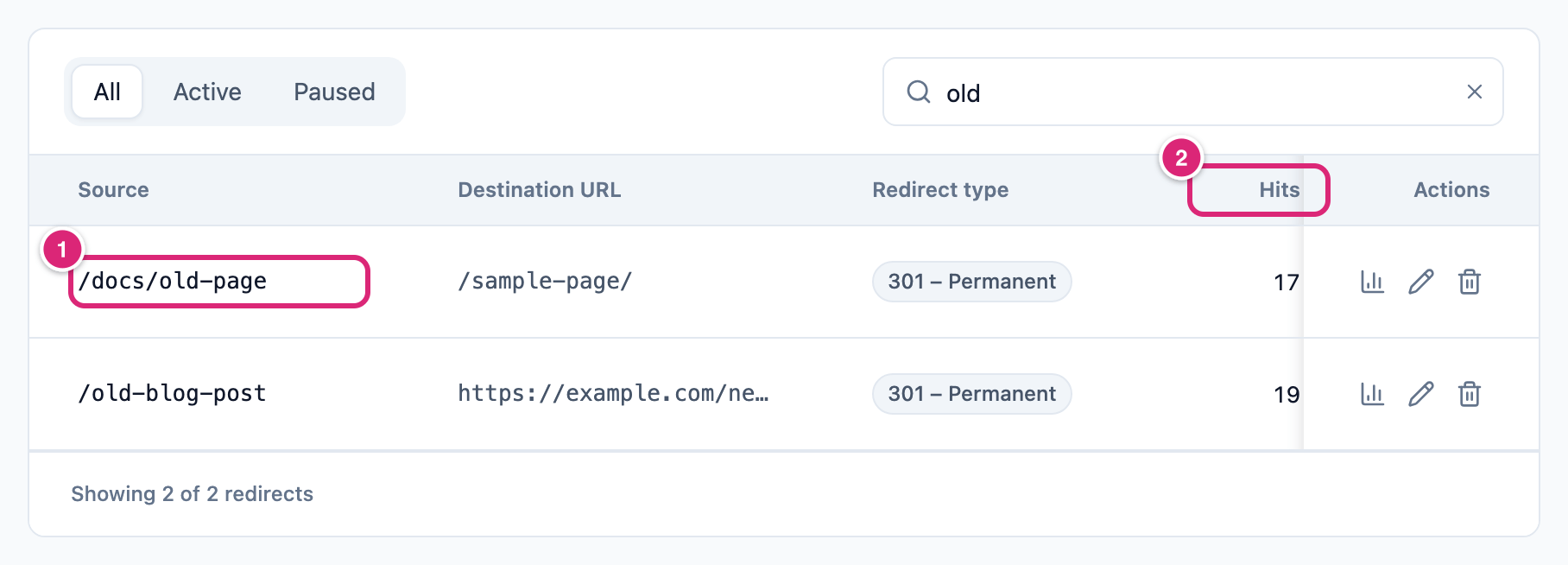
A wildcard redirect, like /docs/*, isn't imported. Nor is one whose path already has an active redirect, or whose destination can't be used. Each case gets a note. More is on Redirects.
When a BetterLinks slug is already taken
If one of your short links already has an imported link's slug, it's the same link only when its destination matches too. A path with more than one part after BetterLinks' prefix, like out/deal or go/2024/deal, never counts as the same link. Your choice under If a slug already exists decides what happens to that same link.
- Keep existing short links (an imported link with the same slug gets a new one): your link gets the old address and the clicks, and nothing else changes. Later imports never add BetterLinks keywords, rules, a password, categories or tags to it.
- Update a short link with the same slug and destination with the imported settings (its clicks are kept): your link takes the BetterLinks settings in the warning below. It keeps its slug, destination, clicks and created date.
WARNING
With the Update choice, your matching link's redirect type, forwarding, and start and expiry dates are overwritten, and cleared where BetterLinks had none. Its ticks become BetterLinks' nofollow and sponsored, so noopener and noreferrer go off. A BetterLinks draft switches it off. Its Name and Note become BetterLinks' title and note, if it has them. Its Priority and auto-linking stay as they are: imported keywords switch auto-linking on only for links the run creates. With those items ticked, it also gets BetterLinks' keywords, rules, categories and tags, and BetterLinks' password replaces yours. Back up first.
A short link with the same slug but another destination is never changed, with either choice. The BetterLinks link comes in under a new slug, and a note lists it.
How categories, tags, keywords and passwords come over
Categories and Tags become Link Manager Pro categories and tags with the same names, on the links that had them. They're added to what a link already has, never in place of it.
Auto-linking keywords become each link's Keywords, added to any it already has. On a link the run creates, auto-linking is switched on, and BetterLinks' keyword priority becomes its Priority. A keyword over the limits (120 characters each, 50 per link) is left out, with a note. BetterLinks' per-keyword options, like opening in a new tab, are kept with the link but not used: your Auto-linking settings apply.
Note
Imported keywords wait while BetterLinks is active, so the same words aren't linked twice. Once you switch BetterLinks off, they start linking, because Link keywords in posts automatically is on by default. How to keep your posts as they are until you're ready is on Migrate to Link Manager Pro.
Passwords puts each BetterLinks password that's switched on onto its short link, so visitors type the same password as before. A plain-text password is saved hashed, and a WordPress password hash is kept as it is. BetterLinks' option to let visitors ask for access isn't supported: a note lists those links. You change a password under Password protection in the link's edit dialog (Create and edit a short link).
How geo rules come over
Geo rules turns BetterLinks' geographic and time-period redirects and its expiry fallbacks into routing rules on the link. Each rule uses the link's redirect type and starts switched on.
| In BetterLinks | Routing rule | It sends visitors to |
|---|---|---|
| Geographic redirect for some countries | "Geo: US, CA", rule Country is US, CA | That redirect's address |
| Time-period redirect | A "Time" rule, active only between its start and end dates | That redirect's address |
| Expiry date with a fallback address | An "Expired" rule, after that date | The fallback address |
| Expiry after a number of clicks, with a fallback address | An "Expired" rule once total clicks pass that number, like "Expired: 50 clicks" | The fallback address |
The expiry rule is checked first, then the others in BetterLinks' order. The first one that matches wins. With an expiry rule, the link has no Expires date, so it keeps working and the rule sends visitors to the fallback. A Country rule matches only when your site knows the visitor's country.
A country name becomes its two-letter code, and a value that can't be read is left out, with a note. Rotation, split tests and device or browser redirects don't become rules: they're kept with the link, with a note. Without Geo rules, a date expiry still becomes Expires, a clicks expiry is left out, and notes name both.
How clicks come over from BetterLinks
Click history brings each recorded BetterLinks click onto its short link, or onto its redirect as a hit. Each keeps its date, country, referrer and browser (built from BetterLinks' browser, system and device names when that's all it kept).
- Clicks BetterLinks marked as made by a crawler (bot) aren't imported. A note gives the count.
- Unique clicks are decided the way Link Manager Pro decides them for new clicks (How clicks are counted).
- IP addresses are stored the way your Anonymize IP addresses setting says at the time of the import. A new install turns that setting on, unless its Tracking settings were saved before.
- Clicks BetterLinks still holds in its
clicks.jsonfile aren't imported, and the import doesn't write to BetterLinks. A note counts them. If BetterLinks is on, it saves them within an hour. If it's off, switch it on first. Then run the import again.
What importing again adds from BetterLinks
A later import never writes an imported link's settings again, so your edits stay. It does add these to links already in, for each item you tick:
| On a later run | What happens |
|---|---|
| Clicks | New clicks only, so none is counted twice |
| Categories and tags | Added only to links that never had them imported. Ones you removed stay removed |
| Password | Added only when the link has none and never had one imported. One you removed stays removed |
| Keywords | Added only to links that never had BetterLinks keywords imported. Auto-linking stays off for them |
| Geo rules | Added only to links that never had BetterLinks rules imported. An expiry that came in as Expires stays, so its "Expired" rule never applies |
| Old address | Never added again once you removed it |
| A short link or redirect you deleted | Imported again, as new |
WARNING
Keep Categories, Tags and Passwords ticked on later runs: links you added or protected in BetterLinks after the first run need them. Categories, tags and passwords you removed from imported links stay removed, so you can clean up at any time. Delete unwanted links and redirects after your last import, or they're imported again.
Import Geo rules on the first run if links have expiry fallbacks. Then import once more right before you turn BetterLinks off, so its newest clicks come over. Clicks still in BetterLinks' clicks.json file need BetterLinks on for up to an hour before they can be imported.
What doesn't come over, and what the notes say
The result groups the notes by data type. Most give a count and the first 5 links, then "…". The cases explained above, like cloaked links, drafts and keywords, get notes too. These are the others:
| Case | What the import does | What the note says, in short |
|---|---|---|
| Destination isn't a web address | Not imported | their destination is not a web address |
| Link with no address | Not imported | they have no address |
Wildcard link, like go/docs/* | Imported for its base address | wildcard matching is not supported |
| Expiry that can't be read, or after clicks with no fallback | Imported without an expiry | imported without it; not supported without a fallback address |
| Click tracking off | Imported, and Link Manager Pro tracks its clicks | Link Manager Pro tracks every link |
| Custom tracking scripts (not run), BetterLinks Pro parameter fields, favorite, uncloaked setting, author | Kept with the link | kept in each link's import details |
| Old address WordPress itself uses | Link imported, address not kept | WordPress uses it, or it isn’t a valid web path |
What the notes call "the link's import details" is stored on that short link, but no screen shows it. Write down anything you want to set up again before you turn BetterLinks off.
Import BetterLinks with WP-CLI
The WP-CLI source name for BetterLinks is betterlinks. This imports every item that has data, with the suggested affiliates:
bash
wp link-manager-pro import --source=betterlinksFor BetterLinks, --items takes links, categories, tags, clicks, passwords, keywords, geo_rules, settings and affiliates. The default leaves out settings and every item that shows 0. An item you name runs even at 0. Every other option is on Migrate to Link Manager Pro.
Three BetterLinks settings can come over. Settings shows how many would change yours, and the browser never ticks it to start with. With WP-CLI, name it with --items=settings. The import writes BetterLinks' values over yours:
| BetterLinks setting | Link Manager Pro setting | What the import does |
|---|---|---|
| Default redirect type | Default redirect type (Link Manager › Settings › Redirection, default 301) | Replaces yours with BetterLinks' 301, 302 or 307. Any other value is left out |
| Its option to leave out bot clicks | Ignore bots (Link Manager › Settings › Tracking, default on) | Turns it on when BetterLinks had it on. Never turns it off |
| Its option not to store IP addresses | Anonymize IP addresses (Tracking; on for a new site, off on a site that had Link Manager Pro before) | Turns it on when BetterLinks had it on. Never turns it off |
BetterLinks' link prefix isn't imported. When it differs from yours, a note says imported links keep their old addresses. Anonymizing applies only to clicks stored after it's on, so run the settings import before clicks if you want it.
Get more out of it
A few steps after the import help your BetterLinks setup work fully.
- Aim imported keyword links at the right posts. BetterLinks' per-keyword limits don't come over. In the link's edit dialog, choose categories or tags under Auto-link only on. When two links share a word, the lower Priority wins (0 to 100).
- Set up device and browser redirects again as a Routing rules rule on Device or Browser. Country rules need the visitor's country: see Send visitors by country or device.
- Review your old page redirects in one place. Search Link Manager › Link Intelligence › Redirects for an old path, and open a redirect to see its hits over time.
If something goes wrong
- If your BetterLinks settings didn't come over, then tick Settings in the browser, or name it in
--itemswith WP-CLI (Import BetterLinks with WP-CLI). It shows (0) when they'd change nothing. - If an old page redirect is missing from Redirects, then check the notes: wildcard redirects and paths that already had a redirect aren't imported. Add it under New redirect.
- If posts show new keyword links after you switched BetterLinks off, then the imported keywords started linking. Turn off Link keywords in posts automatically until you're ready. That pauses all auto-linking on your site. While BetterLinks is active, imported keywords don't link yet.
More fixes are on Troubleshooting.