
Appearance
Share a link or QR code
Copy or share a short link from its report, download its QR code, and see which network sent the clicks.
To share a short link or get a QR code for a short link in WordPress, open the link's report in Link Manager Pro. Its top right holds Copy link and two icon buttons: Share (three connected dots) with seven share buttons, and QR code with Download QR. Always share the short link, like yoursite.com/link/deal, not the destination. Then Link Manager Pro counts its clicks, and you can change where it goes later.
Before you start
- You need access to Link Manager Pro. Administrators always have it, and editors only when an administrator allows it (Access for editors).
- Have the short link ready. Create one first if you haven't (Create your first short link).
- Keep Click tracking on under Link Manager › Settings › Tracking. It's on by default, and the per-network results need it.
Share a short link on social media with UTM tags
The report's Share button opens one button per network. Each one shares the short link with two UTM tags added: utm_source set to the network and utm_medium=social. Email is the one exception: it uses utm_medium=email. So the link's report can tell your Facebook clicks from your LinkedIn clicks.
A new link's report opens by itself after Create short link. For any other link, start from the list.
Link Manager › Short Links- Select the link's row to open its report.
- Select Share 1, the icon with three connected dots at the top right. It sits between QR code 3 and Edit short link.
- Find the network's round button 2 by its icon (the table below names each one). Hovering over a button shows its name: X (Twitter), Facebook, LinkedIn, WhatsApp, Telegram, Reddit or Email.
- Select the network. Its share page opens in a new tab with the tagged link filled in. Email opens a new message in your email app instead.
- Write your post or message there and send it. Link Manager Pro only fills in the link, and the slug as the text or title where the network has one.
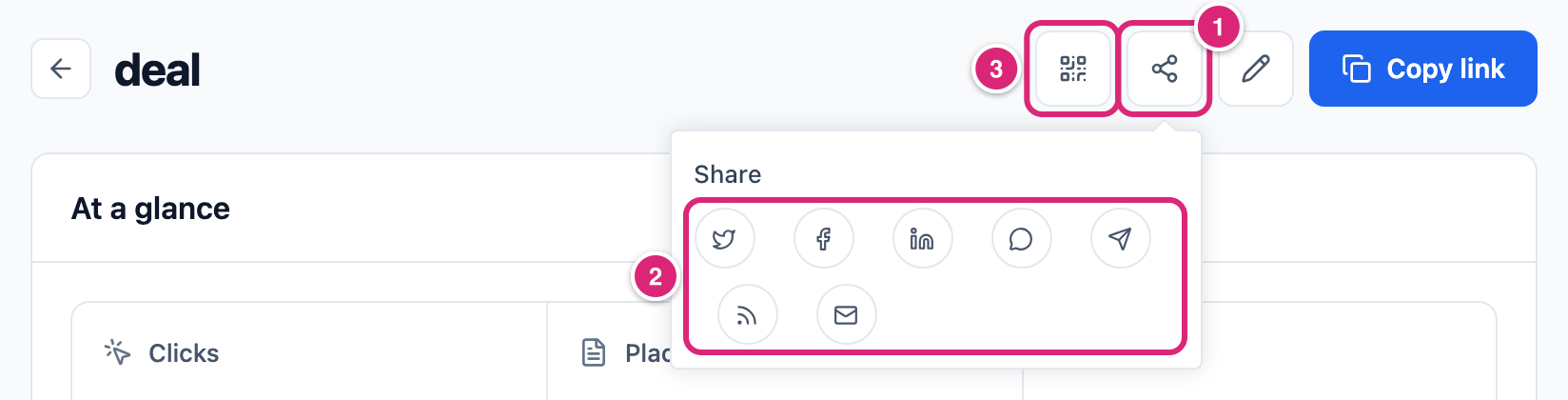
What each button puts in the share:
| Button | Icon | utm_source | Filled in for you |
|---|---|---|---|
| X (Twitter) | A bird | x | The tagged link, and the slug as the post text |
| A lowercase f | facebook | The tagged link | |
| The letters "in" | linkedin | The tagged link | |
| A speech bubble | whatsapp | The slug, then the tagged link, as the message | |
| Telegram | A paper plane | telegram | The tagged link, and the slug as the text |
| A feed (RSS) icon | reddit | The tagged link, and the slug as the title | |
| An envelope | email | The slug as the subject, the tagged link as the body |
Every button adds utm_medium=social, except Email, which adds utm_medium=email. A share of yoursite.com/link/deal on Facebook, for example, posts yoursite.com/link/deal?utm_source=facebook&utm_medium=social.
Do the share tags reach the destination?
Only when the link has Forward the visitor’s query parameters to the destination on, under Schedule & access in its edit dialog. Then the network's utm_source and utm_medium go on to the destination. They replace any utm_source and utm_medium it would otherwise get: site-wide, the link's own, an affiliate's or one already in the Destination URL. With the switch off (the default for a new link), they stop at your site, and the destination gets the link's usual tags. Either way, Link Manager Pro records them with the click while Click tracking is on. The full order is in UTM parameters and forwarding.
To check a share, look at the address in the network's share page before you post. It should end with ?utm_source= and the network's name, then &utm_medium=social. Email opens a new message with the same kind of address in the body, ending &utm_source=email&utm_medium=email.
Which address should you share?
Share the short link itself, like https://yoursite.com/link/deal. Copy link puts that full address on your clipboard and says Link copied. You'll find it at the top right of the report. In the list under Link Manager › Short Links, every row has its own Copy link button.
- A link to one of your affiliates' domains shows under your Affiliate link prefix, like
yoursite.com/recommends/deal, when you set one. Links to your own pages follow Mask internal links, and all others use the Short link prefix (General settings). - The copied link has no tags. Paste it as it is into a bio or a slide, or add tags yourself for one place, like
?utm_source=newsletter&utm_medium=email. - You can change the destination later. Posts, social shares and printed QR codes keep working, because they all point at the short link (Change a short link you already made).
- Changing the slug or the short link prefix changes the address. A new slug stops the old address at once. After a prefix change, addresses with the old prefix keep opening the link (Change your short link prefix).
Download a QR code for a short link
Each short link has a QR code, ready to download as a PNG file. You'll find it in three places:
- In the report, select QR code at the top right, then Download QR.
- In the report's right column, the QR code sits at the bottom of the Link details card, with the address under it and its own Download QR button.
- In the list under Link Manager › Short Links, select the row's QR code button. A QR code dialog opens with Download QR, and Close closes it.
The file is named short-link-<slug>.png, for example short-link-deal.png. It's 192 by 192 pixels, with a narrow white border.
The QR code holds the plain short link, with no tags. Your Site-wide UTM parameters and the link's own tags are added when someone scans it, at the redirect, like on any other click. A scan is a click: it's counted like any visit. A scan has no referring page, so it usually shows as Direct or unknown under Where clicks come from (Link report).
To test a QR code, scan it with your phone's camera. Your test scan counts in the link's numbers like any visitor's click.
See which network sent the clicks
Open the link's report and look at Campaign traffic. Its Source bar shows each network's share of the clicks, like facebook and x, and Medium shows social for clicks from the share buttons, and email for the Email button.
- The three biggest values show on each bar. Select Others for the rest.
- Clicks without tags, like QR scans and the plain copied link, count under the link's own Source and Medium, when it has them. Without them, the shares are of tagged clicks only. So only clicks through a share button carry a network.
- Email shares count under
email, because the Email button tags them that way. - A campaign's report counts its links' own Source and Medium in Channels, so the networks show only in each link's report (Campaigns).
Campaign traffic comes from a saved copy of the report, rebuilt every 600 seconds by default. Right after a click, Recent clicks already shows it, while Campaign traffic catches up after a reload (When the numbers update). How the card counts is on Campaign traffic.
How do you change or stop sharing a link later?
The short link stays the same while you change what's behind it. Edit the link under Link Manager › Short Links, change its Destination URL and select Save changes. Posts, shares and printed QR codes then open the new page.
To stop a shared link without deleting it, set an Expires date under Schedule & access: after it, the short link usually opens your 404 page. Clear the date to bring the link back. A share already posted on a network can't be edited from Link Manager Pro.
Details
| Where | What you get | Holds |
|---|---|---|
| Report, Copy link | The full short address on your clipboard | The plain short link |
| Report, Share | Seven network buttons | The short link plus utm_source=<network>&utm_medium=social (email for the Email button) |
| Report, QR code and the Link details card | A QR code and Download QR | The plain short link |
| Short Links row, Copy link and QR code | The same copy, and a QR code dialog | The plain short link |
- QR file: PNG, 192 by 192 pixels, named
short-link-<slug>.png. There's no size or color option. - The share text, title or subject is the link's slug. Facebook and LinkedIn get only the link.
- When a network builds a link preview, its bot usually opens the short link. Preview bots like
facebookexternalhit,TwitterbotandLinkedInBotare on the built-in bot list, so with Ignore bots on (the default) their visits aren't counted. Entries in Extra bot patterns replace that list, and a bot that sends a normal browser name isn't caught (which clicks aren't counted). - Developers can change the list of networks with the
link_manager_pro_social_share_platformsfilter. Only share addresses that start withhttps://ormailto:are kept. Each network's key, reduced to lowercase letters, digits,-and_, becomes itsutm_source.
Get more out of it
- Send the network to your analytics too. Turn on Forward the visitor’s query parameters to the destination on links you share socially. The destination's analytics can then see
facebookorlinkedinas the source. On those clicks, the network's tags replace the Source and Medium the destination would otherwise get, the link's own included. Forwarding passes every parameter in the address exceptpid, including ones a network adds to shared links. - Tag newsletters by hand. The Email button marks shares as
email, but it opens one message from your own email app. For a newsletter, use Copy link and add?utm_source=newsletter&utm_medium=email, so Campaign traffic shows email apart from social posts. - Give each printed piece its own short link. A QR code carries no tags, so make a separate short link for a flyer, with Source
flyerand Mediumprintin its UTM parameters. Its scans then show underflyerin Campaign traffic (Tag links for a campaign). - Print once, change later. Before you print a QR code, settle the slug and the prefix, and check the link's Starts and Expires dates. After that, edit only the Destination URL when the offer moves: the next scan goes to the new page.
- Pick a readable slug before you share. The slug is the post text on X and the subject of the email, and
spring-salereads better than a randomeLhQMWKU.
If something goes wrong
- If Campaign traffic shows no networks after you shared the link, then the saved copy hasn't caught up yet. Reload the report after the Refresh reports every time (600 seconds by default, under Link Manager › Settings › Advanced). Recent clicks shows new clicks at once. Also check that Click tracking is on.
- If the destination doesn't get
utm_source=facebookor the other network tags, then turn on Forward the visitor’s query parameters to the destination under the link's Schedule & access. Turn it off again to undo. - If Email opens nothing, then your computer probably has no email app set up for email links. Use Copy link and paste the link into your message.
- If a printed QR code stopped opening the link, then check the link first. A scheduled or expired link usually opens your 404 page: clear or move its Starts and Expires dates under Schedule & access. A deleted link is gone: create a new short link with the same slug. If the slug changed, change it back, or add the old address under Other addresses (Other addresses and conflicts). If the old prefix was replaced and a page or redirect now uses that address, or you changed the prefix five more times, add the old address the same way, or change the prefix back (Change your short link prefix).
- If copying fails, then select the address shown as Short link under At a glance and copy it yourself. It's shown without
https://, so add that in front.
More fixes are on Troubleshooting.