
Appearance
Link Intelligence settings
Set up broken link scans, visitor 404 logging, Link Audit minimums, the editor box and Link Equity.
The Link Intelligence tab holds the broken link scan settings for Link Health, how visitor 404s are logged and kept, the minimums Link Audit uses to call a post weak, the internal link box in the post editor, and the two numbers behind Link Equity.
Where to find it
Link Manager › Settings › Link IntelligenceIn the screenshot, the Link Intelligence tab 1 is open. It starts with Scheduled health scans 2 and Track visitor 404s 3. Minimum links to a post 4 is the first Link Audit minimum.
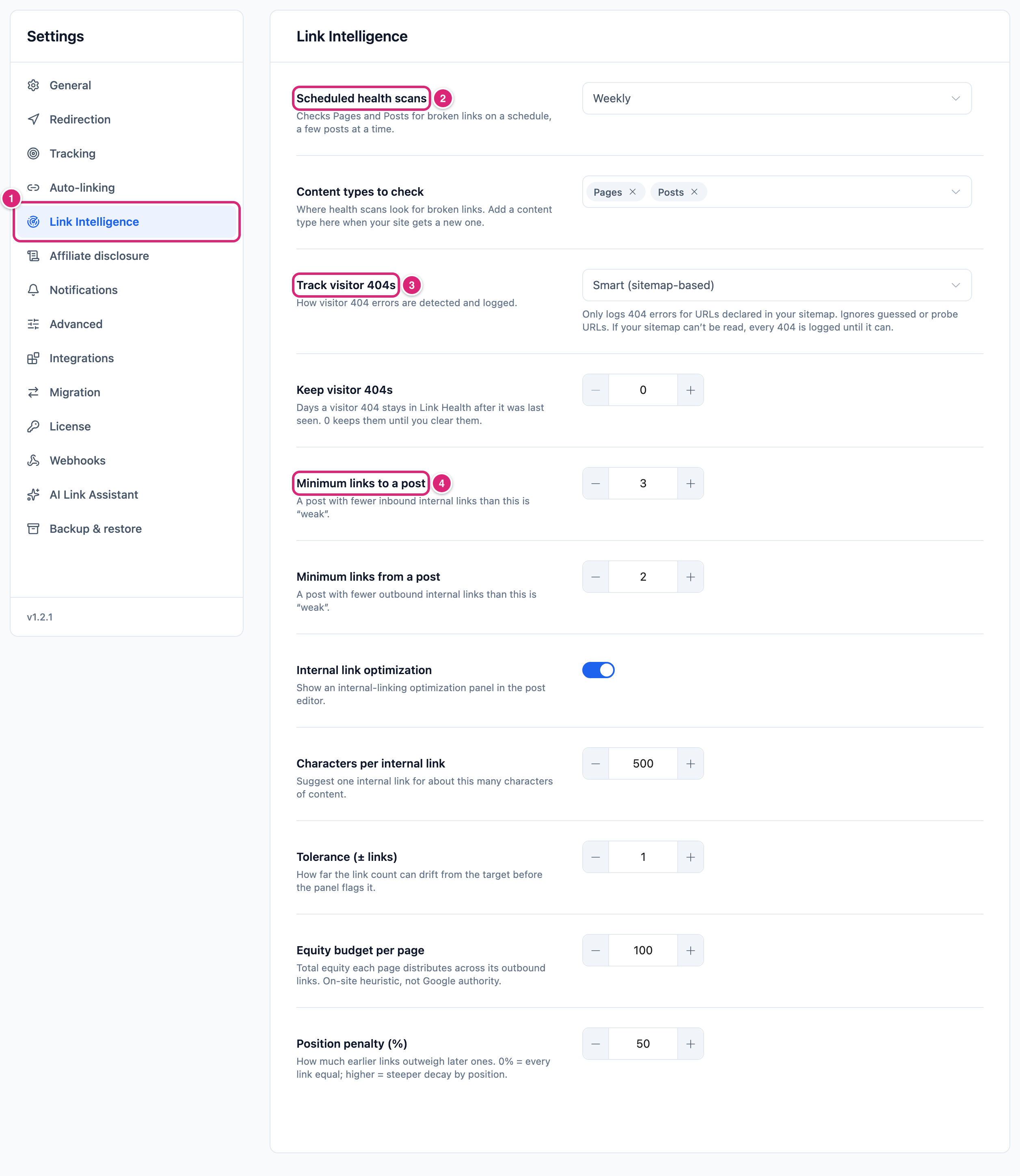
Only administrators see this tab. From Link Health, the More actions menu (the ⋯ button) opens it too, as Link Intelligence settings.
Changes take effect when you select Save changes (or press Ctrl+S, ⌘S on a Mac), and Settings saved. confirms it. Until then, each changed row shows Edited, and Cancel puts back the saved values. If you leave the tab with unsaved changes, Link Manager Pro asks before it discards them. If saving fails, for example because the connection dropped, Couldn’t save. Your edits are kept. shows next to the buttons and Save changes becomes Retry.
Settings and defaults
Every setting on the tab starts with the default below. Only Scheduled health scans differs on a new site.
| Setting | Default | Choices | What it does |
|---|---|---|---|
| Scheduled health scans | Never (Weekly on new sites) | Weekly, Monthly, Never (Daily only if already set) | Scans your content for broken links in the background. Needs at least one type in Content types to check. More |
| Content types to check | Posts and Pages | Your site's public content types, except media | Where Link Health scans look, and which content issues it lists. More |
| Track visitor 404s | Smart (sitemap-based) | Smart (sitemap-based), All URLs | Which 404s that visitors hit are logged. More |
| Keep visitor 404s | 0 (keep until you clear them) | 0 to 3650 days | Removes visitor 404s not seen for that many days. More |
| Minimum links to a post | 3 | 1 to 20 | A post with some, but fewer, other posts linking to it is Weak in Link Audit (none at all is Orphaned). More |
| Minimum links from a post | 2 | 1 to 20 | A post with fewer internal links in it is Weak in Link Audit. More |
| Internal link optimization | On | On or off | Shows the Internal link optimization box in the post editor. More |
| Characters per internal link | 500 | 50 to 5000 | Sets the box's Recommended count: one internal link per this many characters. Works only while Internal link optimization is on. More |
| Tolerance (± links) | 1 | 0 to 20 | How far a post can be from Recommended and still count as Well optimized. Works only while Internal link optimization is on. More |
| Equity budget per page | 100 | 1 to 10000 | The total equity each post or page shares among its links in the Link Equity report. More |
| Position penalty (%) | 50 | 0 to 100 | How much more an earlier link gets than a later one in the same post. More |
The number fields save whole numbers. The number fields round to a whole number in the field as you type or leave it, so 2.6 becomes 3. A decimal sent straight through the REST API is cut to the whole number below it. A value past a limit is set to the limit: typing 6000 in Characters per internal link leaves 5000.
Broken link scan settings
Scheduled health scans runs the Link Health content scan in the background, and Content types to check decides what it reads. A new site starts on Weekly. A site that had Link Manager Pro before keeps its own choice, which is Never if nobody ever chose one.
Scheduled health scans in short:
- Weekly runs a pass every week, Monthly every 30 days. Never stops the schedule, and you can still select Scan content in Link Health at any time.
- The first pass starts at the next WordPress scheduled-task run after you save. Switching to another schedule, for example from Weekly to Monthly, starts a pass at the next scheduled-task run, and the new rhythm counts from there.
- Daily shows in the list only on a site already set to it. Once you save another choice, it isn't offered again after the tab reloads.
- How a pass works through your posts, and its limits, are in Scheduled broken link scans.
Content types to check lists your site's public content types, for example Posts, Pages and a shop's products. Media isn't offered. The choice applies to both Scan content and the scheduled scan. It applies to Link Health only: Link Audit and Link Equity always read published posts and pages.
- With no type chosen, the row says Nothing is checked until you choose at least one. Scan content is then grayed out, and scheduled passes check nothing.
- Taking a type out hides its content issues in Link Health. Adding it back shows them again.
- The row's description under Scheduled health scans names the types you chose, like "Checks Posts and Pages for broken links on a schedule, a few posts at a time."
Which answers count as broken (only 404 and 410) is explained in What counts as a broken link.
Smart 404 tracking and the sitemap
Track visitor 404s decides which 404s that visitors hit are logged under Visitor 404s in Link Health. Smart (sitemap-based), the default, logs 404s at addresses your sitemap lists, and 404s that visitors reached from a link on your own pages (bots excluded). All URLs logs every 404 a visitor hits.
- Smart mode skips addresses that bots guess or probe, which keeps the list short.
- It also skips old addresses your sitemap no longer lists, such as pages you removed or moved, unless a visitor reached one from a link on your own pages. Old addresses reached from search, bookmarks or other sites are often the 404s worth fixing, so choose All URLs after you remove or move pages.
- While no sitemap can be read, Smart mode logs every 404, like All URLs. The Visitor 404s tab in Link Health then shows Every visitor 404 is logged for now, and Check again reads the sitemap at once.
- Both choices skip files like images and scripts, and WordPress's own paths like
/wp-admin/.
Which sitemaps are read, and how often, is in Monitor 404 errors from visitors.
Keep visitor 404s
WARNING
A number above 0 deletes visitor 404s for good at the next daily run, Fixed and Ignored ones included, with their hits. An ignored address that's hit again later comes back as a new 404 that needs attention. To keep a copy, back up Link Health first (Back up and restore).
Keep visitor 404s sets how many days a visitor 404 stays after it was last seen. The default, 0, keeps them until you clear them. With 90, a 404 nobody has hit for 90 days is removed, whatever its status. Removal runs once a day.
Link Health keeps up to 5,000 visitor 404 addresses. Past that, new ones aren't logged until you clear some or this setting removes them. That's the main reason to set a period on a busy site.
Minimum internal links for Link Audit
Minimum links to a post and Minimum links from a post set when Link Audit calls a post Weak. With the defaults, a post is weak when only 1 or 2 other posts link to it, or when it has fewer than 2 links to your own pages.
How Link Audit counts:
- Minimum links to a post counts other published posts and pages that link to the post. Each one counts once, however many links it has, and a post's link to itself doesn't count.
- Minimum links from a post counts every link in the post to your own site, including relative links like
/about/. A short link counts by where it leads, so/link/dealto another site isn't internal. - A post nothing links to is Orphaned, whatever the minimums. A post that meets both minimums is Healthy.
What a change does:
- The Weak posts card, the Weak and Healthy filters and the Coverage score use the new minimums once you save. The score takes off up to 30 points for weak posts, in proportion to the share of audited posts that are weak (orphaned ones count too), so raising a minimum can lower your score.
- The status badge on each row is worked out from the counts and your current minimums, so a changed minimum shows on the rows at once.
How the score and the list work is on Link Audit.
Internal link optimization in the editor
Internal link optimization adds a box of the same name to the post editor. It shows how many internal links the post has (Internal links) next to how many it should have for its length (Recommended). It's on by default.
Recommended is the post's text length in characters (HTML tags not counted), divided by Characters per internal link and rounded down. Tolerance (± links) sets how far the count can be from that number:
| Internal links in the post | The box shows |
|---|---|
| From Recommended minus the tolerance up to Recommended plus the tolerance | Well optimized |
| Fewer | Add more internal links |
| More | Consider fewer internal links |
A worked example with the defaults (500 characters, tolerance 1): a post of 2,400 characters gets a Recommended of 4. Three to five internal links show Well optimized, two or fewer Add more internal links, six or more Consider fewer internal links. A short post of 564 characters gets a Recommended of 1, so five internal links in it show Consider fewer internal links.
A post with any text gets a Recommended of at least 1, even when it is shorter than Characters per internal link. With the default tolerance of 1, three or more internal links in it show Consider fewer internal links. A post with no text never shows it. Lower Characters per internal link if your site has many short pages.
- The box counts internal links the same way as Minimum links from a post.
- It shows in every content type that uses the WordPress editor, in both the block and the classic editor, to anyone who can edit that post.
- It reads the last saved version (Based on the last saved content.). The block editor updates it after each save, and the classic editor reloads the page when you save. Refresh reads the saved post again.
- Turning Internal link optimization off removes the box for everyone. Characters per internal link and Tolerance (± links) then change nothing.
More about the box and the other editor tools is on Editor tools.
Link Equity budget and position penalty
Equity budget per page and Position penalty (%) decide how the Link Equity report shares out weight. Each published post and page gives its budget, 100 by default, to the links in it, internal and external alike. The position penalty, 50% by default, gives earlier links a bigger share than later ones.
Link Equity is an estimate made on your own site. It isn't a Google score, and it doesn't change your posts or how search engines see them.
A worked example: a post with 4 links shares its budget of 100 like this.
| Position penalty | 1st link | 2nd | 3rd | 4th |
|---|---|---|---|---|
0% | 25 | 25 | 25 | 25 |
50% (default) | about 31 | about 27 | about 23 | about 19 |
100% | 40 | 30 | 20 | 10 |
- A higher penalty moves weight from later links to earlier ones. It doesn't shrink the post's budget, and even at
100%the last link gets a share. - Links to other sites take their share too, so a post with many external links passes less to your own pages.
- Changing the budget changes every Equity number in the same proportion, so the order of the list stays the same. Changing the penalty can change the order.
- Both apply from the next Scan site on Link Equity. Until then the report keeps the last full scan.
How to read the report is on Link Equity.
Get more out of it
- Pick All URLs for a few weeks after a redesign or a cleanup, so old addresses get logged (why). Fix the 404s with the most hits, then clear the rest or set a Keep visitor 404s period, like
90, so the list doesn't fill up at 5,000. - Add new content types the day you add them. A shop's products or a custom post type for reviews aren't checked for broken links until they're in Content types to check.
- Raise the Link Audit minimums only as far as you'll act on them. Raising Minimum links to a post from
3to5lists more posts as Weak and can take up to 30 points off the Coverage score. The minimums apply to every post, so pick a level your typical post can reach. - Match Characters per internal link to how you write. At
500, a 1,500-character post gets 3 recommended links. If your posts are long and your topics narrow,800or1000keeps the box from asking for links you wouldn't add. - Compare penalties before you trust a ranking. Scan Link Equity with the default
50, then with0. Pages that stay near the top either way get many links, not only early ones. Then set Position penalty (%) back to50and select Scan site again.
If something goes wrong
- If Scan content is grayed out in Link Health, then no type is chosen under Content types to check. Choose at least one and save.
- If Visitor 404s stays empty although visitors hit 404s, then Smart mode is logging only addresses in your sitemap and addresses visitors reached from your own pages. Choose All URLs under Track visitor 404s. To go back, choose Smart (sitemap-based) again.
- If Site Health says Automatic link health scanning is disabled, then choose Weekly or Monthly under Scheduled health scans here (Never stops it again). The test's Open Link Intelligence settings button opens this tab.
- If Link Equity numbers didn't change after you saved a new budget or penalty, then select Scan site on Link Equity.
More fixes are on Troubleshooting.