
Appearance
Integrations settings
Set how click tracking waits for cookie consent, when your page cache is cleared, and what the SEO plugin rows do.
The Integrations tab connects Link Manager Pro to the other plugins on your site. It makes link tracking wait for cookie consent when Complianz, CookieYes or Cookiebot is active. It clears your page cache when your links change. When Rank Math or SEOPress is active, it can also bring their redirects over.
Where to find it
Link Manager › Settings › IntegrationsOnly administrators see Settings. Changes take effect when you select Save changes (or press Ctrl+S, ⌘S on a Mac). Until then, each changed row shows Edited, and Cancel puts back the saved values. If saving fails, Couldn’t save. Your edits are kept. appears next to the buttons and Save changes becomes Retry.
The tab shows only the rows that apply to your site. The consent rows need a supported consent plugin, and the SEO rows need an active SEO plugin. With none of those, you see Clear page cache when links change and the Cookie consent row. The tab doesn't show which cache plugin it found.
Settings and defaults
Each row links to its section below. New sites get the same defaults.
| Setting | Default | Choices | What it does |
|---|---|---|---|
| Clear page cache when links change | On | On or off | Clears the page cache of five cache plugins after a change to your links, auto-linking or redirects. More |
| Respect visitor consent | On | On or off | The tracking cookie waits until the visitor accepts the Consent category. Shows only while Complianz, CookieYes or Cookiebot is active. More |
| Consent category | Statistics | Statistics, Marketing, Any | Which category the visitor must accept. Shows only while Respect visitor consent shows and is on. More |
| Cookie consent | Nothing to set | Lists the consent plugins Link Manager Pro works with. Shows instead of the two rows above while none of them is active. More | |
| Rank Math 404 log cleanup | Manual | Manual, Automatic | Whether Link Manager Pro clears Rank Math's 404 log for addresses your redirects now handle. Shows while Rank Math is active, its 404 Monitor module is on and its log table exists on your site. More |
| A row per active SEO plugin | Import redirects (Rank Math and SEOPress) | Shows the plugin and how many redirects it has. More |
The consent settings keep working while their rows are hidden. Respect visitor consent and Consent category keep their saved values (on and Statistics by default), and apply once a supported consent plugin is active.
Clear page cache when links change
Clear page cache when links change clears your whole page cache after a change that can alter your pages or redirects. It's on by default and works with five cache plugins: WP Rocket, LiteSpeed Cache, W3 Total Cache, WP Super Cache and WP Fastest Cache.
A page cache keeps copies of your pages. Auto-links are added each time a page is built, so a cached copy can show an old link, or the page an old address showed before you added a redirect. Clearing the cache makes the next visit build the page again.
Changes you make that clear the cache:
- Creating, editing or deleting a short link in the link form, or creating one with the block editor's Short link button, the classic editor's Insert short link dialog or the Quick Add widget on the WordPress Dashboard. Links made automatically, for example by Mask links when saving posts, the AI Link Assistant or AutomatorWP, don't clear it.
- Adding or removing an other address, or settling an address conflict.
- Creating, editing or deleting an affiliate.
- Creating, editing or deleting a redirect, including one made from Link Health.
- Saving the Auto-linking tab.
- Saving the General tab with a new Short link prefix, Internal link prefix or Affiliate link prefix, or with Mask internal links switched on or off.
- Importing from another plugin, restoring a backup, and the WP-CLI commands
linkandunlink. - While any short link has other addresses: publishing, unpublishing or trashing a post, changing a published post's slug, and turning Pretty Links, ThirstyAffiliates or BetterLinks on or off.
After a clear, Link Manager Pro waits 30 seconds before it clears again. A change made during those 30 seconds schedules one more clear about 30 seconds later. So when you edit several links in a row, the first change clears the cache at once and the last change of the burst clears it shortly after.
What isn't cleared:
- Caches other than the five plugins: your host's server cache, a CDN like Cloudflare, or another cache plugin. Clear those yourself.
- Saving any other settings tab, for example Redirection or Affiliate disclosure, or the General tab without a prefix or Mask internal links change.
- A scheduled short link that starts. Its start isn't a change that clears the cache.
- Anything at all while the switch is off.
Short link and redirect visits are marked not to be cached
Whatever this switch says, Link Manager Pro marks a visit as not to be cached each time it answers it: an active short link, an other address or a matched redirect. It sets WordPress's DONOTCACHEPAGE flag and tells LiteSpeed Cache not to cache the visit. It also sends Cache-Control: private, no-store, no-cache, max-age=0, must-revalidate. The aim is that every visit reaches WordPress, so the click is counted and routing rules apply.
These marks have limits. A host or CDN cache decides for itself whether it follows them (see the tip). A page cached at that address before the link or redirect existed is served before WordPress runs, until the cache is cleared. An expired link isn't answered, so its address gets no marks. A scheduled link's 404 is marked not to be cached, so a page cache doesn't keep it past the start time.
For WP Rocket, Link Manager Pro also adds your current Short link prefix, Internal link prefix and, when you set one, Affiliate link prefix to WP Rocket's never-cache list, through WP Rocket's own filter. A previous prefix still in its 90-day grace period is added too. One past its grace period isn't. Visits through it are still marked as not to be cached when they reach WordPress.
While Click tracking is on and your site has a page cache (WordPress's WP_CACHE setting is on, or wp-content/advanced-cache.php exists), WordPress Site Health shows a recommendation about it. It warns that a page cache may be answering your short links, and lists your prefixes, like /link/, /go/ (and the affiliate prefix, when set), to leave out of caching.
Cookie consent for link tracking
Respect visitor consent makes the click tracking cookie wait for the visitor's consent. It works with Complianz, CookieYes and Cookiebot, and it's on by default. Only the cookie waits: while Click tracking is on, clicks are recorded with or without consent.
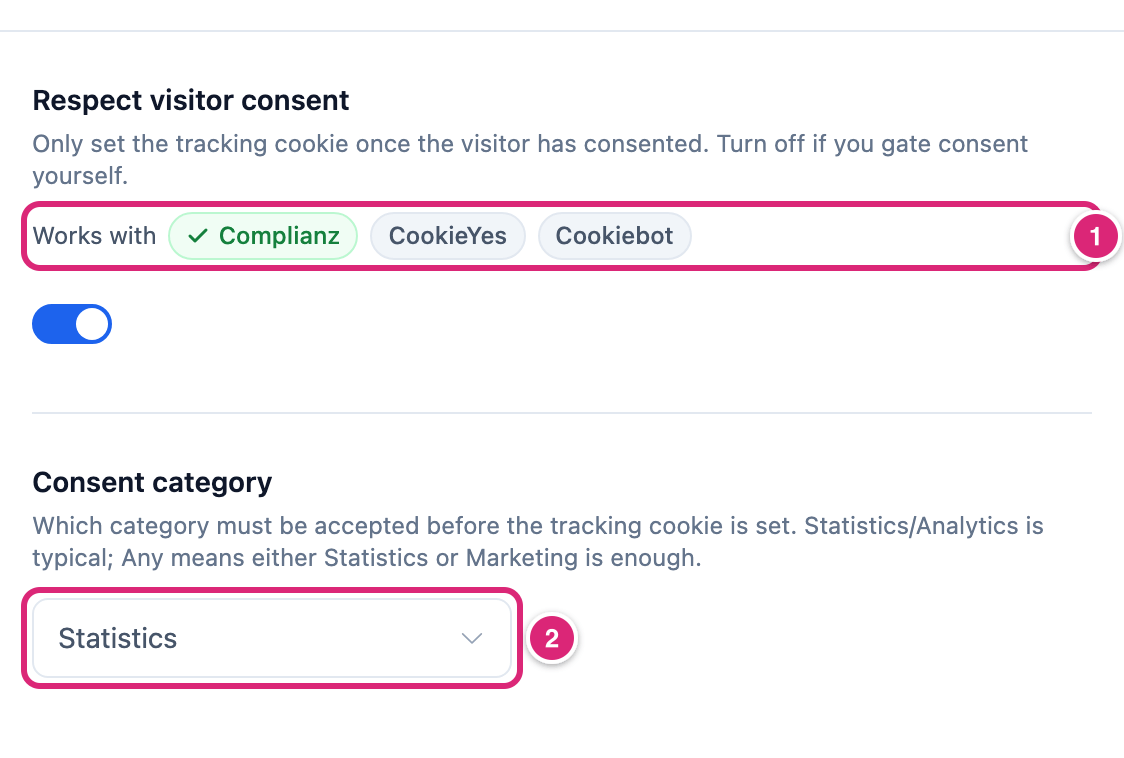
- Works with lists the three consent plugins. A tick marks the one consent plugin Link Manager Pro reads.
- Consent category is the category the visitor must accept before the cookie is set (Consent category).
The cookie is link_manager_pro_id. It tells whether a click is a visitor's first on a link (How clicks are counted). With this switch on and a supported consent plugin active, each visit through a short link, an other address or a redirect goes like this:
- With consent, and while Click tracking is on, the cookie is set, or the visitor's existing one is used. It lasts 1 year.
- Without consent, no cookie is set. If the visitor already has one, it's deleted at that visit.
- Either way, while Click tracking is on, the click is recorded like any other (Tracking settings lists what's left out, such as bots). It keeps its time, the link, the IP address, the browser details, the page they came from and the country if known. It also keeps the post the link was in, the routing rule that matched, any
utm_values in the address, and the WordPress user of a logged-in visitor. Without the cookie, a click is unique unless the same IP address and browser clicked that link before.
Consent is checked at every visit, so a visitor who withdraws consent loses the cookie at their next visit through a short link, an other address or a redirect. Ordinary page views don't remove it. Clicks on links to your own pages (internal click tracking) check consent too: they use the cookie only with consent, and never set or remove it.
How Link Manager Pro reads each plugin:
| Consent plugin | How consent is read |
|---|---|
| Complianz | Link Manager Pro asks Complianz whether the visitor accepted the category. Complianz answers by its own setup, including its region settings. If Complianz is found but its consent check isn't available, the cookie is allowed. |
| CookieYes | Link Manager Pro reads CookieYes's consent cookie. Statistics is its Analytics category, and Marketing its Advertisement category. A visitor without that cookie hasn't consented. |
| Cookiebot | Link Manager Pro asks Cookiebot whether the category is accepted. If Cookiebot's check fails with an error, the cookie is allowed. |
With more than one of them active, Link Manager Pro reads only the first in this order: Complianz, CookieYes, Cookiebot. Works with ticks only that one, and the others show unticked.
With no supported consent plugin active, the Cookie consent row takes the place of these settings. It lists the three plugins, and the cookie is set without waiting.
If the tab can't check which consent plugins are active, it shows Respect visitor consent without Works with, so you can still change it. Consent category shows below it only while Respect visitor consent is on. A Cookie consent row then shows Status unavailable with a Retry button and the note "Couldn’t check for cookie consent plugins. Try again."
The consent wait is set here only. The switch I handle cookie consent for my visitors under Cookie notice on the Affiliate disclosure tab doesn't change it.
Note
Respect visitor consent covers the tracking cookie only. It doesn't stop clicks from being recorded, and it doesn't change what a click keeps. To store less, turn on Anonymize IP addresses or set Keep click data for on the Tracking tab. A password-protected short link sets its own cookie for a day after the right password, without waiting for consent. What your site has to ask for is between you and your privacy adviser: see Privacy and personal data.
Turning the switch off sets the cookie for every visitor while Click tracking is on, whatever your consent plugin says. Do this only if you decide consent another way, for example with the filter below.
For developers: the decision runs through the link_manager_pro_cookie_consent filter. Return false to stop the cookie. Link Manager Pro adds its own callback at priority 10 while it loads. With the switch on and a supported plugin active, that callback's answer replaces what ran before it: callbacks with a lower priority number (for example 5), and those at priority 10 added before Link Manager Pro loads. A callback at priority 10 added later (for example in your theme) or at 11 or more runs after it and has the last word. With the switch off, or with no supported plugin, the filter's value is used as it is, and it's true unless your code changes it.
Consent category
Consent category sets which consent category a visitor must accept before the tracking cookie is set. The default is Statistics.
| Choice | The cookie is set when the visitor accepted |
|---|---|
| Statistics | The statistics category (CookieYes: Analytics) |
| Marketing | The marketing category (CookieYes: Advertisement) |
| Any | Statistics or Marketing, either one is enough |
The row shows only while Respect visitor consent is on. Pick the category your consent banner uses for click and visit statistics, so visitors' answers in the banner mean what they read there.
SEO plugins
The SEO plugin rows show what Link Manager Pro found from Rank Math, SEOPress, All in One SEO and Yoast SEO. They appear only while one of these plugins is active, with one row per plugin showing Active and its version.
- Rank Math and SEOPress: the row says how many redirect rules the plugin holds. With at least one, Import redirects opens a dialog that checks them and shows what it can import. It imports exact-match redirects to your Redirects screen. Steps, limits and what's skipped are on Import SEO plugin redirects.
- All in One SEO and Yoast SEO: the row says the plugin was detected and that there are no redirects to import here.
Rank Math 404 log cleanup shows only while Rank Math is active, its 404 Monitor module is switched on and the 404 log table exists on your site. If Rank Math's module check isn't available, Link Manager Pro checks for the table alone. It decides what happens to entries in that log once one of your redirects handles the address:
- Manual (the default): the import dialog offers Also clear these URLs from Rank Math’s 404 log (they’re handled now)., unticked.
- Automatic: that box starts ticked. Also, when you create or edit an active redirect on the Redirects screen, Link Manager Pro clears Rank Math's 404 entries for its address.
Only active redirects clear entries. Redirects made from Link Health don't clear them automatically.
If the check for SEO plugins fails, a SEO plugins row shows Status unavailable with a Retry button. The consent check has the same row: Cookie consent shows Status unavailable with Retry.
Get more out of it
- Clear your cache once after a batch of edits. The last change of a burst also clears the cache shortly after, so a manual clear is rarely needed. Clear your cache plugin by hand if you want to see the result at once.
- Keep redirects out of every cache layer. A host or CDN cache isn't cleared and may not read WordPress's flags. Add your prefixes (for example
/link/,/go/and an affiliate prefix like/recommends/) to its never-cache list, the way Site Health suggests. Add an old prefix too, for as long as you share addresses that use it. - Check the consent wait yourself, with a banner that asks first (opt-in). Open your site in a private window, don't answer the banner, and open a short link. Your browser's developer tools show no
link_manager_pro_idcookie. Accept statistics in the banner, open a short link again, and the cookie appears. - Pair consent with less stored data. Clicks without consent still keep an IP address, so keep Anonymize IP addresses on (it's on for new sites) and set a Keep click data for period on the Tracking tab.
- Set Rank Math cleanup to Automatic if you fix Rank Math's 404s on the Redirects screen. Each active redirect you create or edit there then takes its address off Rank Math's 404 log.
If something goes wrong
- If an old link, old auto-link or old page still shows after a change, then your cache isn't one of the five, or Clear page cache when links change is off. Clear your cache by hand, and check the switch. Turning it on starts clearing after changes again; turn it off to undo.
- If the tracking cookie never appears after a visitor accepts, then check that Consent category matches the category they accepted. With several consent plugins active, only the first of Complianz, CookieYes and Cookiebot is read. Custom code on the
link_manager_pro_cookie_consentfilter may also returnfalse. - If the cookie is set before consent, then check that Works with ticks your consent plugin (with several active, only the first is ticked) and that Respect visitor consent is on (turn it off again to stop waiting). If you see the Cookie consent row instead, Link Manager Pro doesn't find a supported plugin and sets the cookie without waiting.
- If Import redirects is missing, then the SEO plugin isn't active, holds no redirect rules, or is All in One SEO or Yoast SEO, whose redirects can't be imported here. If the SEO plugins row shows Status unavailable instead, select Retry.
- If the consent rows show without Works with, then the tab couldn't check your consent plugins. Select Retry on the Cookie consent row.
More fixes are on Troubleshooting.